Gothic Font Generator: Copy and Paste Gothic Text in Any Style
A gothic font generator converts the text you type into gothic-style Unicode characters you can copy and paste anywhere. No downloads, no font installation, no design software required. Type your text, pick a style, hit copy, and paste it into Instagram, Discord, a tattoo mock-up, a gaming profile, or anywhere else that accepts text.
A gothic font generator works by replacing standard letters with Unicode characters that look like medieval blackletter script. Because these are Unicode text characters (not a font file), they paste and display correctly on virtually every modern platform including Instagram, WhatsApp, Discord, TikTok, and gaming apps without any installation.
What Is a Gothic Font Generator?
A gothic font generator is an online tool that converts regular text into gothic-style Unicode characters styled after medieval blackletter script. The output looks like ornate, angular lettering from 12th–15th century European manuscripts, but it’s technically a set of Unicode symbols from the Mathematical Alphanumeric Symbols block, not a traditional font file.
This matters more than it sounds. When you change fonts in Microsoft Word or Google Docs, the underlying text is still normal text.
A font is just a visual skin. But when a gothic font generator converts your text, it actually replaces each letter with a different character entirely. The letter “r” becomes 𝔯, which has its own Unicode identifier (U+1D52F). That’s why gothic text keeps its appearance when you paste it somewhere else. The character itself is gothic, not just the display.
The practical upside: it works everywhere that supports Unicode, which is basically every app and platform released in the last 15 years.
Gothic, Blackletter, Fraktur, Old English: What’s the Difference?
Most people use these terms interchangeably, and honestly, that’s fine for casual use. But if you’re trying to pick the right style for a tattoo or a logo, knowing the differences helps.
| Style name | What it looks like | Historical origin | Best for |
|---|---|---|---|
| Gothic / Blackletter | Dense, angular letters with thick and thin strokes | Western Europe, 12th century | General use, Instagram bios, gaming names |
| Fraktur | Sharp, broken curves, elaborate serifs; the most ornate style | German printing tradition, 15th–20th century | Tattoos, band logos, heritage branding |
| Bold Gothic (Fraktur Bold) | Same as Fraktur but heavier weight | Modern adaptation | Gaming clan names, headers, anything needing impact at small size |
| Old English | Rounded version of blackletter, slightly more readable | English manuscript tradition | Sports jerseys, tattoos, classic look |
| Victorian Gothic | More decorative flourishes, rounder forms | 19th-century British printing | Vintage designs, wedding stationery, logos |
| Gothic Script / Cursive Gothic | Flowing, connected strokes; less angular | Medieval hybrid styles | Creative projects, decorative text |
These are all part of the same blackletter family. When someone says “Old English font generator” or “blackletter font generator,” they mean the same general category as gothic. The terminology is historically inconsistent, and that’s not your problem to solve. Pick the style that looks right for what you’re making.
One important distinction: Century Gothic is not in this family at all. It’s a clean, modern sans-serif typeface designed in 1991. If someone asks for “Century Gothic,” they want something that looks nothing like medieval script.
How to Use the Gothic Font Generator (Copy and Paste)
Using a gothic font generator is genuinely one of the simpler things you can do online. Here’s the exact process:
That’s the whole process. You don’t need to create an account, download anything, or pay anything. Gothic Unicode characters are part of the universal text standard, so generating and using them is free by definition.
One limitation to know: Gothic Unicode characters only exist for the 26 letters of the standard Latin alphabet. Numbers exist in some gothic styles, but special characters like accented letters (é, ü, ñ) don’t have gothic Unicode equivalents. If your text includes those, they’ll appear in regular font alongside the gothic characters.
Gothic Font Styles Explained
Old English Gothic Font
Old English is the most recognizable gothic style for most people in the US and India. It’s what you see on sports jerseys, tattoo shops’ flash sheets, and newspaper mastheads like The New York Times. The letters are bold, slightly rounded compared to strict Fraktur, and readable enough that most people can make them out even without prior exposure to blackletter.
When someone searches for “old english gothic font generator,” they almost always want this style. It’s the default expectation for “gothic” in a general audience.
Blackletter / Fraktur Gothic Font
Fraktur is the historically accurate version. It dominated German printing from the 15th century until the mid-20th century and was used in formal documents, manuscripts, and the earliest printed Bibles. The letters are sharper, more angular, and more elaborate than Old English. The serifs are small, pointed spurs rather than flat feet.
For tattoos that need to look genuinely medieval or serious, Fraktur is the right call. It’s also the style most heavy metal bands use for album artwork and logos because it reads as both dark and authoritative.
Victorian Gothic Font
Victorian Gothic emerged in 19th-century British printing and has more decorative flourishes than strict blackletter. The letterforms are slightly rounder and the ornamental details are more prominent. It works well for vintage-inspired designs, formal invitations, and anything where you want gothic character with a bit of elegance rather than just weight.
Bold Gothic Font
Bold Gothic is Fraktur with heavier strokes. At small sizes (like a gaming username in a profile picture or a Discord tag), regular gothic can get lost. Bold Gothic solves that. If you’re generating a gaming clan name or a social media handle that needs to pop at thumbnail size, the bold variant is more practical.
Gothic Script / Cursive Gothic Font
Gothic Script blends the angular blackletter tradition with flowing, connected strokes. It’s less strict than Fraktur and more creative. Good for decorative projects where you want something that reads as gothic but feels less rigidly medieval.
Modern Gothic Font
Modern Gothic strips away the heaviest ornamentation and retains the general vertical, angular character of blackletter in a cleaner form. It’s still clearly gothic but more approachable and easier to read. Useful when you want the aesthetic association without the full medieval intensity.
Gothic Font Generator for Tattoos
Tattoos are one of the top use cases for gothic font generators, and they deserve a proper explanation rather than a throwaway sentence.
The reason gothic text is so popular for tattoos comes down to legibility at small sizes and the visual weight of the letterforms. Gothic letters are designed to be dense and bold, which means they hold up well when scaled down to tattoo dimensions. A thin script font can blur and lose definition over time as skin ages. Blackletter stays readable.
Which gothic style works best for tattoos?
For most tattoo applications, Bold Gothic (Bold Fraktur) or Old English are the practical choices. Here’s why:
How to use the generator for tattoo planning:
Type the word or phrase you’re considering. Try it in Bold Gothic, Old English, and Fraktur. Screenshot each version. Take the screenshots to your tattoo artist and ask which will hold up best at the size you want. Your artist can tell you if the line weight is too thin for the placement. The generator gives you a starting point, not a final design.
Try our latest Tattoo Font Generator to create hundreds of tattoo font styles instantly.
Gothic Font for Instagram, Discord, and Social Media
Gothic text works on most major platforms because they all support Unicode. Here’s exactly how to use it on the ones people ask about most.
For your bio: Open the generator, type your bio text or username, copy the gothic version, open Instagram, go to Edit Profile, paste into the Name or Bio field, and save. The gothic text will display to everyone who visits your profile on any device. If you want even more stylish profile text, try our Instagram Bio Font Generator to create unique bio fonts in seconds. Your gothic text will display to everyone who visits your profile on any device.
For captions: Same process. Type your caption in the generator, copy, paste into the Instagram caption field when you’re posting.
One real limitation: Instagram’s search doesn’t index Unicode characters the same way as standard text. Your gothic username won’t appear in search results the way a regular name would. For your display name or bio, that’s fine. For discoverability, it’s a tradeoff.
Discord
Discord supports Unicode fully. You can use gothic text in your username, server nickname, status message, and channel messages. Type your text in the generator, copy, paste into Discord wherever you want it. It renders correctly for everyone in the server regardless of their device.
Learn about discord text formatting
Twitter / X
Twitter supports Unicode in display names, bios, and tweets. Gothic text works fine in all three. Keep in mind that Twitter’s character limit counts Unicode characters the same as standard ones, so a gothic tweet costs the same character count.
WhatsApp statuses and messages support Unicode. Your gothic text will display correctly to contacts on both iPhone and Android. Works in group chats too.
Gaming: PUBG, Free Fire, Roblox, Fortnite
This is the use case most platforms ignore, and it’s enormous in India and Pakistan specifically.
PUBG and BGMI: Both support Unicode in player names and clan names. Copy your gothic username from the generator and paste it into your profile name field. Gothic Bold or Bold Fraktur works best at the small sizes player names display in lobbies.
Free Fire: Free Fire supports Unicode in nicknames. Same process. Many players in South Asia use stylish fonts including gothic for their in-game names, and Free Fire’s character limit accommodates it.
Roblox: Roblox has restrictions on special characters in usernames, so Gothic Unicode may not work for the username itself. It does work in display names and in some game text fields.
Fortnite: Similar to Roblox, the main username field has restrictions. But Gothic text works in creative mode signs and some text inputs within games.
This gothic font generator is perfect for social media bios and usernames.
Gothic Font for Logos
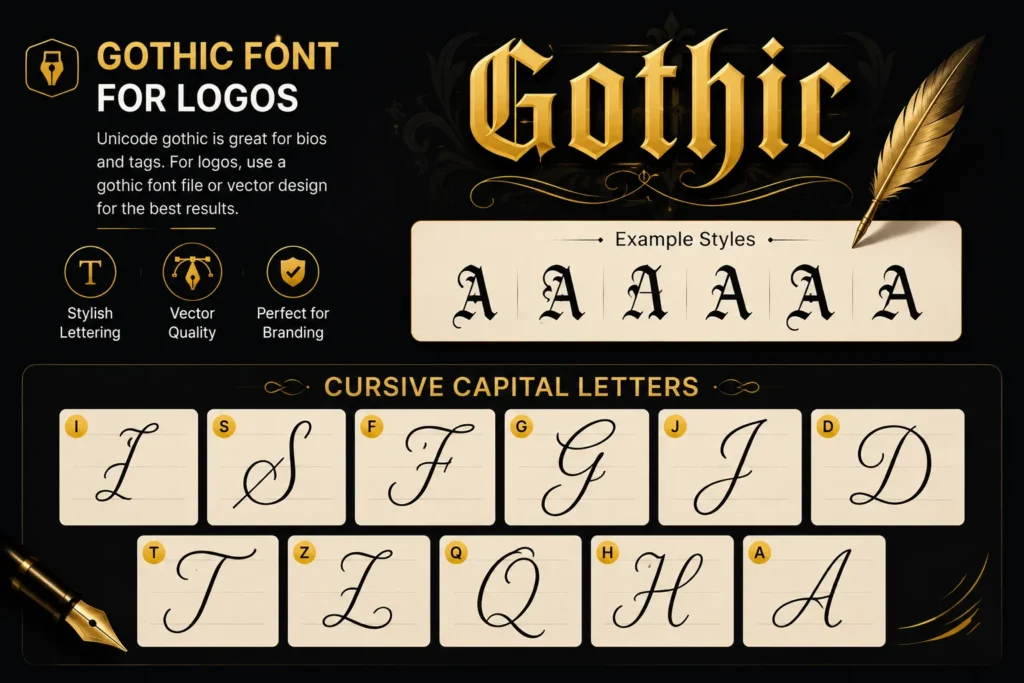
If you’re designing a logo and want gothic lettering, the Unicode copy-paste approach has a significant limitation you should know: Unicode gothic characters are text, not vector graphics. You can’t control stroke width, adjust letterforms, add colour effects, or scale them without quality loss in the same way you can with a proper font file or vector design. If you’re curious about how websites use actual font files instead of Unicode text, the CSS Fonts guide provides a helpful introduction to web typography.
For a social media bio or a gaming tag, Unicode gothic is perfect. You can use our gothic font generator to create stylish gothic text instantly and copy it wherever you need it. However, for a logo you’re going to print on merchandise, use on a website header, or build into a business identity, it’s better to download a genuine gothic font (such as Old London, Chomsky, or Cloister Black) or work with a designer who creates vector artwork for maximum quality and scalability.
That said, the gothic font generator is genuinely useful for logo planning. You can generate your brand name in several gothic styles, screenshot the options, and use them as reference images when briefing a designer or when choosing which style direction to take before committing to a downloadable font.
Gothic Font Generator for Numbers
Yes, gothic number styles exist in Unicode. Numbers rendered in gothic style look great in gaming IDs, on jersey designs, in tattoo pieces that include dates or years, and in any design where you need numerals that match gothic lettering.
Not every gothic style has a full numeral set. Fraktur has the most complete number coverage in Unicode. If you’re generating a birth year for a tattoo, a jersey number, or a gaming ID that includes digits, use the generator and check which styles render all your numbers correctly before committing to one.
When Not to Use Gothic Fonts
This is something almost no tool page tells you, and it’s worth knowing.
Gothic fonts trade readability for aesthetics. Your brain processes simple letterforms faster than ornate, decorated ones. It’s not opinion, it’s basic typography. For short text, that’s an acceptable trade. For longer text, it becomes a real problem.
Use gothic fonts for: single words, names, short phrases (under 8 words), dates, numbers, headers, usernames, bios.
Don’t use gothic fonts for: body copy, long captions, anything someone needs to read quickly, instructions, full sentences in small size.
The best results come from pairing gothic text with a clean, readable font. Use gothic for the heading or the name, and a standard sans-serif or serif for everything else. That contrast is actually what makes gothic lettering pop visually. When everything is gothic, nothing stands out.
Unicode vs Downloadable Gothic Fonts: What’s the Difference?
People often get confused between “gothic text from a generator” and “gothic font files you install.” Here’s the practical difference:
| Feature | Unicode gothic (this generator) | Downloadable gothic font file |
| Installation needed | None | Yes, on each device |
| Works on social media | Yes | No |
| Works in Word / Docs | Sort of (paste as text) | Yes |
| Scales for print | No | Yes |
| Consistent across devices | Yes | Only if installed on both |
| Good for Instagram bio | Yes | No |
| Good for logo design | Reference only | Yes |
| Cost | Free | Usually free; some are paid |
| Examples | This generator | DaFont, 1001 Fonts, Google Fonts |
For social media, gaming, and messaging: use Unicode. For print, professional logos, or design software: download a font file.
Does Gothic Text Work on Mobile?
Mostly yes. Unicode support on modern smartphones (both iOS and Android) is comprehensive. Gothic characters generated by this tool display correctly in virtually every app released in the last several years.
The exceptions are older Android devices (pre-Android 8.0 roughly) which have limited Unicode coverage and may display gothic characters as blank squares or question marks. If you’re seeing boxes instead of gothic letters when you paste, that’s usually the cause.
You can test this before committing: send the gothic text to yourself in a WhatsApp message or a text, then check how it looks on both the device you generated it on and any other device you care about. What you see is what your audience sees.
Frequently Asked Questions
The full gothic style library is in the generator above. Type anything, try every style, copy what works. It takes about 10 seconds.