Small Text Generator: Turn Normal Text Into Tiny Unicode Letters
A small text generator converts your regular letters into tiny Unicode characters, ˡⁱᵏᵉ ᵗʰⁱˢ, that you can copy and paste anywhere text is accepted. It’s not a font change. It’s a swap to a different set of Unicode letters that just happen to render smaller. Type your text, pick a style, copy the result, and paste it into your Instagram bio, a Discord name, a tweet, or a caption.
A small text generator (also called a small letter text generator or small text font generator) maps your normal letters to Unicode small caps, superscript, or subscript characters. These are real characters built into Unicode, not images and not installable fonts, so they paste and display correctly almost everywhere, though a handful of letters don’t have perfect small-text equivalents.
What Is Small Text, Really?
Small text is a set of Unicode characters, mainly from the “Superscripts and Subscripts” and “Phonetic Extensions” blocks, that visually resemble shrunken versions of standard letters and numbers. They are separate characters, not a smaller-sized version of your current font, which is why they can be copied and pasted between apps without losing their look.
Here’s the part most people get wrong: you’re not “shrinking” your text the way you’d shrink a font size in a Word document. Every device has thousands of Unicode characters built in, and a few of those character sets just happen to look like miniature letters. A small text generator simply finds the small-text equivalent for each letter you type and swaps it in.
That’s also why small text isn’t a complete alphabet. Unicode was built for math and science notation first, so it includes things like ² for exponents and ₂ for chemical formulas, but it was never designed to give every letter a “tiny” twin. Some letters (especially in subscript) don’t have an official small version, so generators substitute the closest-looking character instead.
Small Caps vs. Superscript vs. Subscript
Most small text generators, including a small letter text generator that produces multiple styles at once, give you three main options. They look similar at a glance, but they behave differently and suit different uses.
| Style | Example | Best For | Letter Coverage |
| Small Caps | ѕᴍᴀʟʟ ᴄᴀᴘѕ | Usernames, bios, headings, titles | Full A-Z coverage, most reliable |
| Superscript | ˢᵘᵖᵉʳˢᶜʳᶦᵖᵗ | Footnotes, exponents (x²), short labels, trademark-style notes | Nearly full A-Z, slightly inconsistent shapes |
| Subscript | ₛᵤᵦₛ𝒸ᵣᵢₚₜ | Chemical formulas (H₂O), math notation, very short tags | Incomplete, missing b, c, d, f, g, q, w, y, z |
Small caps are the safest default if you just want something that looks polished and reads easily. Superscript and subscript are better suited to short bursts of text (a label, a number, a single word) because long sentences in either style get harder to read.
How to Use a Small Text Generator
Using a small text generator takes about ten seconds, whether you’re on a phone or a computer. Here’s the process:
That’s the whole workflow. No sign-up, no app install, and no font file to download, because there’s no font involved at all, just a different set of characters.
Where Small Text Works (and Where It Doesn’t)
Because small text is plain Unicode, it works in almost any app that handles modern text encoding. But “almost any” isn’t “every,” and a few platforms handle it differently than you’d expect.
| Platform / App | Does It Work? |
| Instagram (bio, captions, comments, DMs) | ✅ Yes, displays normally |
| TikTok, Twitter/X, Facebook, Pinterest | ✅ Yes |
| Discord, Telegram, WhatsApp, Slack | ✅ Yes |
| Reddit (new Reddit) | ✅ Yes, renders correctly |
| Reddit (old Reddit / some subreddit styles) | ⚠️ Mostly fine, occasional display quirks |
| Google Docs, email (rich text) | ✅ Yes |
| Plain-text SMS or older email clients | ❌ Often shows boxes or question marks |
| Screen readers | ⚠️ Inconsistent, see accessibility note below |
If you ever see boxes, question marks, or odd symbols instead of small text, the app you pasted into doesn’t fully support that range of Unicode characters. That’s not something the generator can fix. It’s a limitation of the receiving app.
How to Add Superscript Text on Reddit
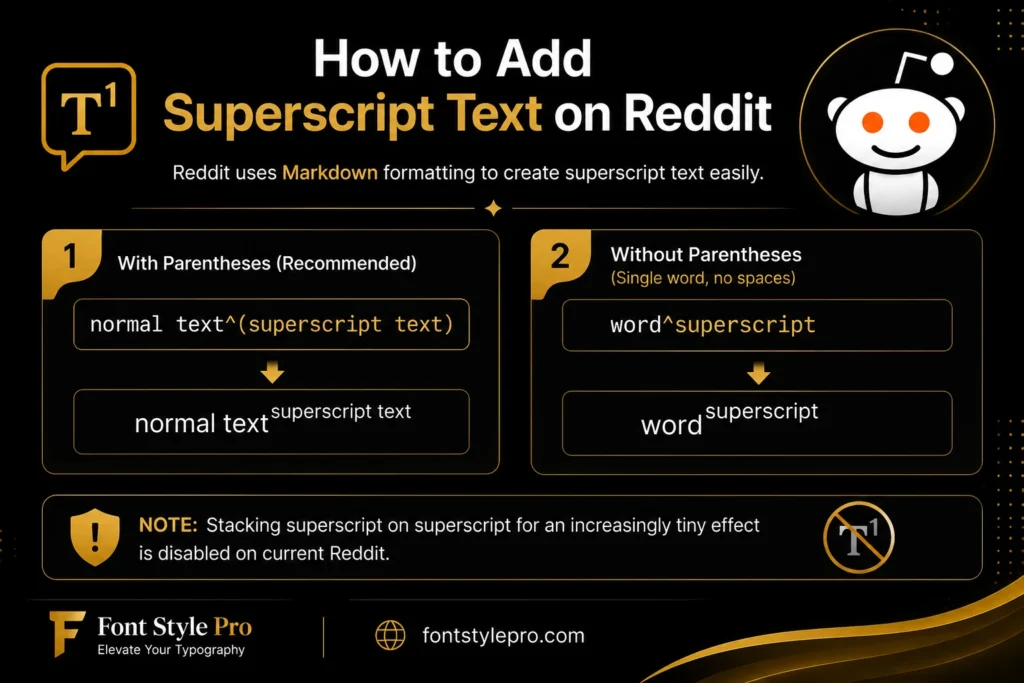
Reddit has its own way of doing superscript, separate from the Unicode small text generators cover. You don’t need a generator for this one. Reddit’s Markdown formatting handles it directly.
To create superscript on Reddit, type a caret (^) immediately before the text you want raised, like this: normal text^(superscript text). If the superscript is a single word with no spaces, you can skip the parentheses entirely: word^superscript works fine.
Older versions of Reddit allowed stacking superscript on superscript for an increasingly tiny effect, but that’s been disabled on current Reddit.
A Note on Accessibility
This is worth knowing before you go all-in on tiny letters: Unicode small caps, superscript, and subscript characters aren’t always read correctly by screen readers. Some assistive technology announces them by their formal Unicode names, like “modifier letter small h,” instead of reading them as normal letters, which turns a short bio into a confusing string of jargon for someone using a screen reader.
Small caps tend to fare better than superscript or subscript because more of those characters map cleanly to standard Latin letters. If accessibility matters for your account or content, and for most public-facing profiles it should, keep small text to short decorative touches rather than entire sentences or your whole bio.
While tiny Unicode letters create a unique visual effect, it’s also worth learning about traditional typography styles, such as serif fonts, and how they influence readability and design.
Small Text vs. Tiny Text vs. Whisper Text: What’s the Difference?
Short answer: nothing. These are all names for the same thing. A small text generator, tiny text generator, whisper text generator, micro text generator, and small letter text generator all produce the same Unicode small caps, superscript, and subscript characters. The name just depends on which site you land on.
Where it gets genuinely confusing is the difference between “small text” and “fancy text.” Small text refers specifically to characters that look smaller than normal: small caps, superscript, subscript. Fancy text is a much broader category that includes bold, italic, cursive, bubble letters, upside-down text, and dozens of other Unicode styles that aren’t necessarily smaller, just different-looking.
So if someone calls it a “small text font generator,” they mean the same tool. Unicode doesn’t actually have downloadable “fonts” in this context, just character sets that look small.
Try More Fancy Text Styles
Small text is just one corner of what Unicode can do. If you want something bolder or weirder for your bio, username, or post, check out ourfont style generator for bold, italic, and cursive styles and the Tattoo font generator for Tattoo fonts.