
Superscript Generator: Copy and Paste ˢᵘᵖᵉʳˢᶜʳⁱᵖᵗ Text Instantly
Paste your text into the box above and this superscript generator converts it to Unicode superscript characters (like this: ˡⁱᵏᵉ ᵗʰⁱˢ) that you can copy and paste anywhere: Discord, Instagram, WhatsApp, Google Docs, you name it. It works because the output is real Unicode text, not styled formatting that breaks when you move it.
Try our free online tool at Font Style Pro to explore more typography and text styling options.
What Is Superscript Text, Exactly?
Superscript is text that sits slightly above the normal line, smaller and raised, like the “2” in x² or the “st” in 1ˢᵗ. You’ve seen it your whole life in math, chemistry, and footnotes. Most people just don’t know how to type superscript letters outside of Word or Google Docs.
In a text editor like Word, you highlight any character and hit a button to raise it. But that “raised” effect is just metadata, styling instructions glued to the character. The moment you paste that text into Discord, Instagram, or a plain-text field, the metadata strips out and you’re left with flat, normal text.
Unicode superscript solves this. Instead of styling a character to look raised, it swaps in a completely different character, one that already is superscript by definition. That’s why it survives the copy-paste.
Superscript is a character (letter, number, or symbol) rendered at a smaller size and positioned above the text baseline. In Unicode, dedicated superscript code points exist in the Superscripts and Subscripts block (U+2070 to U+209F) and the Modifier Letters block, so the raised position is baked into the character itself, not applied by formatting.
You can also explore more fun text styles like the Lenny Face generator.
Superscript vs. Subscript: Which One Do You Need?
These two always get confused, so let’s sort it out fast.
| Superscript | Subscript | |
| Position | Above the baseline | Below the baseline |
| Looks like | x² · E=mc² · 1ˢᵗ | H₂O · log₂ · CO₂ |
| Common uses | Exponents, footnotes, ordinals, ion charges (Ca²⁺), isotopes | Chemical formulas, mathematical indices, log bases |
| Unicode coverage | Most letters + all digits | Digits + fewer letters |
| Social media | Works well for stylized bios and raised text effects | Mostly used for chemical/math notation |
The simple rule: if the small character goes up, it’s superscript. If it goes down, it’s subscript. This tool handles both. It’s a full subscript and superscript generator on one page. Need subscript specifically? Jump to our subscript generator.
How to Use This Online Superscript Generator
Three steps, genuinely:
The tool handles superscript and subscript on the same page, so if you need H₂O and x² in the same line, you’re covered.
One thing worth knowing: not every character has a Unicode superscript equivalent. The superscript converter handles what it can and leaves the rest as normal text, so your output is always readable, never garbled.
What Characters Convert to Superscript? (Full Reference)
This is the table most tools don’t publish. Here’s exactly what works and what doesn’t.
Superscript Numbers (all supported)
| Normal | Superscript |
|---|---|
| 0 | ⁰ |
| 1 | ¹ |
| 2 | ² |
| 3 | ³ |
| 4 | ⁴ |
| 5 | ⁵ |
| 6 | ⁶ |
| 7 | ⁷ |
| 8 | ⁸ |
| 9 | ⁹ |
Superscript Letters
Most lowercase letters have Unicode superscript equivalents. Two exceptions: “i” and “q” have no dedicated Unicode superscript characters. Generators work around this using the closest available look-alike (ᶦ and ᵠ), which display fine in most places but are technically approximations.
| Normal | Superscript | Supported? |
| a | ᵃ | Yes |
| b | ᵇ | Yes |
| c | ᶜ | Yes |
| d | ᵈ | Yes |
| e | ᵉ | Yes |
| f | ᶠ | Yes |
| g | ᵍ | Yes |
| h | ʰ | Yes |
| i | ᶦ | Approximation |
| j | ʲ | Yes |
| k | ᵏ | Yes |
| l | ˡ | Yes |
| m | ᵐ | Yes |
| n | ⁿ | Yes |
| o | ᵒ | Yes |
| p | ᵖ | Yes |
| q | ᵠ | Approximation |
| r | ʳ | Yes |
| s | ˢ | Yes |
| t | ᵗ | Yes |
| u | ᵘ | Yes |
| v | ᵛ | Yes |
| w | ʷ | Yes |
| x | ˣ | Yes |
| y | ʸ | Yes |
| z | ᶻ | Yes |
Superscript Symbols (Copy-Ready)
| Symbol | Superscript | Use Case |
| + | ⁺ | Ion charges (Na⁺) |
| – | ⁻ | Ion charges (Cl⁻) |
| = | ⁼ | Math |
| ( | ⁽ | Grouping |
| ) | ⁾ | Grouping |
| TM | ™ | Trademark |
| R | ® | Registered |
| ° | ° | Degrees |
How to Use Superscript on Discord
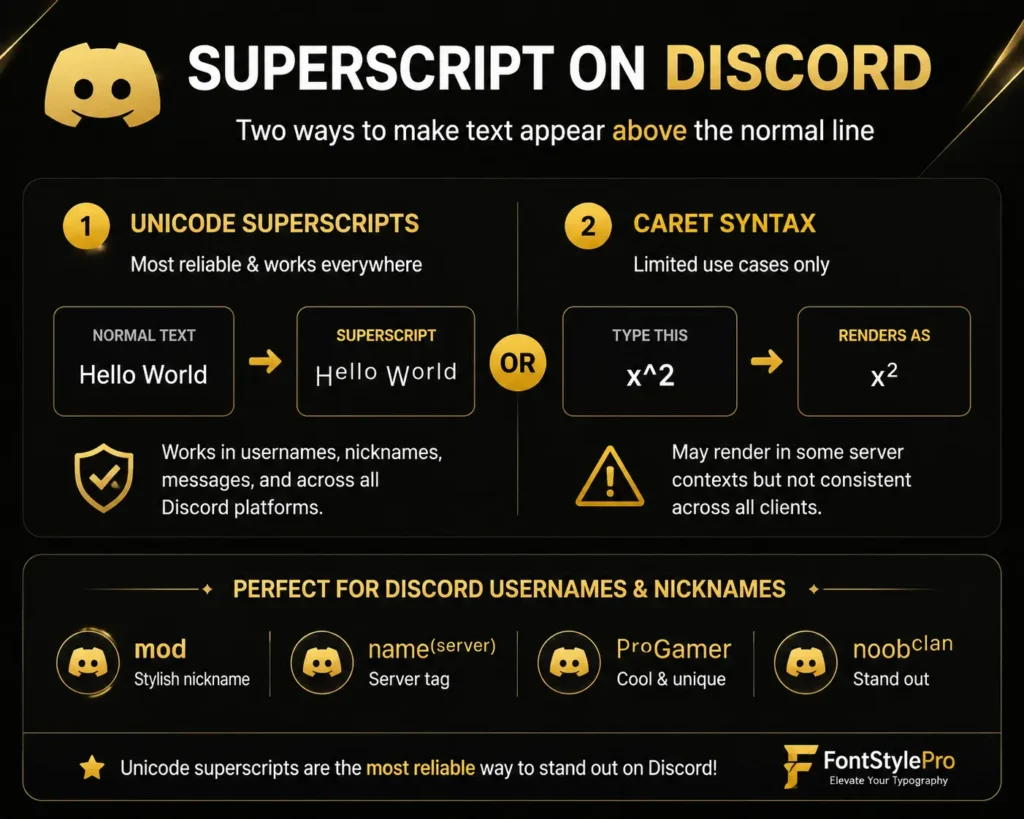
This is the copy-paste method. Use the Discord superscript generator at the top of this page, copy your output, and paste it directly into any Discord message, server nickname, or bio. Discord renders Unicode characters without issue.
Step-by-step:
Option 2: Caret Syntax (limited use cases only)
Discord’s Markdown engine supports the ^ caret symbol in some server contexts. Type x^2 and it may render as x². This only works for simple cases and isn’t consistent across all Discord clients. For anything beyond basic exponents, including full words in superscript or stylized usernames, the Unicode method above is more reliable.
For Discord usernames and server nicknames, Unicode superscript letters work well. A nickname like ᴍᵒᵈ or a stylized tag like ⁿᵃᵐᵉ⁽ˢᵉʳᵛᵉʳ⁾ is achievable with this tool and looks distinctive next to plain-text names.
Where Does Superscript Text Actually Work?
| Platform | Works? | Notes |
| Discord | ✅ | Chat, nicknames, bios |
| ✅ | Bios, captions, stories | |
| Twitter / X | ✅ | Tweets, bios, DMs |
| ✅ | Individual and group messages | |
| TikTok | ✅ | Bio and comments |
| ✅ | Posts, comments, bios | |
| ✅ | Posts and bio | |
| ✅ | Unicode works; native caret syntax also available | |
| Slack | ✅ | Messages and profile |
| Google Docs | ✅ | Pastes as plain Unicode text |
| Microsoft Word | ✅ | Same |
| Gmail / Outlook | ✅ | Works in plain text mode |
| YouTube comments | ✅ | |
| Notion | ⚠️ | Depends on block type |
| Some older forums | ⚠️ | May restrict non-ASCII characters |
The short version: if a platform accepts Unicode text, and nearly all of them do, your superscript copy and paste will work. If you see blank boxes or question marks, the platform is blocking extended Unicode, which is rare.
Real Use Cases: Why People Need a Superscript Text Generator
Math and Science
Writing x², E=mc², or 10⁻³ in a plain-text field like a Discord message, tweet, or WhatsApp group is impossible without Unicode superscript. You can’t type an actual raised “2” on a standard keyboard. You can type x^2 and hope people understand the notation, or you can paste x² and have it look right.
Chemistry users need superscript numbers for ion charges: Ca²⁺, Fe³⁺, OH⁻. Nuclear physics uses it for isotopes like ²³⁸U. In technical communities, correct notation signals credibility.
Academic Footnotes and Citations
Chicago style places a superscript number immediately after a referenced sentence, like this¹, pointing to a footnote. AMA style, common in medical writing, does the same but points to a numbered reference list. If you’re using a superscript generator in a plain-text environment without a citation plugin, Unicode superscript numbers are the practical solution.
Ordinal Suffixes
Writing 1ˢᵗ, 2ⁿᵈ, 3ʳᵈ, 4ᵗʰ instead of 1st, 2nd, 3rd, 4th looks noticeably cleaner in posts, captions, and announcements. It’s a small detail that signals care in your writing.
Social Media Bios and Creative Text
Raised superscript text creates a visual effect that’s immediately distinctive. It’s not a downloadable superscript font. It’s a Unicode treatment that stands out in a sea of plain bios. Common uses:
Trademark and Copyright Symbols
The ™ and ® symbols are already part of standard Unicode and display as superscript-adjacent glyphs in most contexts. Pair them with surrounding superscript text using this generator for a consistent look in bios and profile descriptions.
Small Text Generator: Tiny letters that sit on the baseline (small caps + subscript styles)
How to Type Superscript Without a Generator
Sometimes you’re already in a document and need the keyboard method.
Microsoft Word
| Action | Windows | Mac |
| Toggle superscript on/off | Ctrl + Shift + + | Cmd + Shift + + |
Or use the x² button in the Home tab, Font section.
Google Docs
| Action | Shortcut |
| Toggle superscript | Ctrl + . (Windows) / Cmd + . (Mac) |
LibreOffice Writer
| Action | Shortcut |
| Superscript | Ctrl + Shift + P |
Apple Pages
Go to Format > Font > Baseline > Superscript. No default keyboard shortcut, but you can assign one in System Settings.
HTML
Use the <sup> tag: x<sup>2</sup> renders as x². This works in any HTML environment but not in plain-text fields like Discord or Instagram.
On iPhone or Android
Phone keyboards don’t support native superscript for letters. Gboard on Android lets you long-press some number keys to reveal ², ³, etc., but only for digits. For letters, open this page on your phone, type into the generator, tap Copy, and paste it where you need it. Takes about fifteen seconds.
Is It a Font? (No, and Here’s Why That Matters)
Many people search for a “superscript generator” thinking they need to download something. You don’t. What a superscript generator produces isn’t a font. It’s Unicode.
The difference matters because fonts are display instructions that only work if the device has the font installed and the app supports custom fonts. Unicode characters are part of the text itself. They travel with your text no matter where you paste it.
If you format “Hello” in a purple font in Word and paste it into Discord, Discord ignores the color and font. But if you paste ᴴᵉˡˡᵒ (Unicode modifier letters), Discord shows exactly what you typed, because those shapes are the characters themselves, not a formatting overlay.
Superscript in Reddit and Other Markdown Platforms
Reddit has a native workaround worth knowing: type ^word in a comment and it renders as superscript. For multiple words, use ^(this phrase). It works cleanly in most subreddits.
The catch: this is Reddit-only Markdown syntax. It doesn’t work in Discord, it doesn’t work in Instagram, and pasting caret-syntax text elsewhere just shows the caret. For anything shared across platforms, Unicode superscript from this tool is the more portable choice.
Frequently Asked Questions
A Note on Academic and Technical Writing
If you’re using a superscript generator, especially for writing formal papers, thesis, or scientific documents, it’s better to rely on your word processor’s native superscript formatting rather than Unicode characters. LaTeX, reference managers like Zotero, and academic publishing systems correctly interpret native formatting. Unicode superscript characters, while visually similar, may cause issues with indexing, accessibility tools (screen readers), and export formats like PDF/A.
For everything else, including social media, messaging apps, plain-text fields, bios, and Discord, Unicode superscript is the right tool. For formal documents with a defined publishing pipeline, the native route wins.