Bubble Text Generator: Copy, Paste, and Design Bubble Letters in Seconds
Type your text into the box below, pick a style, and click copy. That’s the whole process. A bubble text generator turns normal letters into circled or squared Unicode characters like ⓑⓤⓑⓑⓛⓔ, so you get bubble letters you can paste straight into Instagram, TikTok, Discord, or Word without installing a single font. Create a unique Instagram profile with our Instagram bio font styles and make your bio stand out instantly.
A bubble text generator converts regular letters into circled or squared Unicode characters (from blocks like Enclosed Alphanumerics), producing bubble letters that work as plain text anywhere Unicode is supported. Fontstylepro’s bubble text generator version gives you 6 copy-paste Unicode bubble styles plus a separate 3D Studio for glossy, balloon, and metallic bubble graphics you download as PNG images.
What Is Bubble Text?
Bubble text is a font style where each letter sits inside a small circle or square, giving your words a soft, rounded, playful look. It’s also called bubble font, bubble letters, circled text, or ball letters, and it’s built from real Unicode characters, not images or special fonts.
That last part matters more than people realize. Because bubble text is Unicode, it behaves exactly like normal text. You can paste it into a caption, rename a Discord channel, or drop it into a Google Doc, and it travels with the text every time someone copies, quotes, or screenshots it.
Looking for a creative text effect? Try our mirror text generator to instantly flip your words and create eye-catching mirrored text.
How to Make Bubble Text: 3 Steps
That’s it. No sign-up, no app, no waiting on a render. This bubble text generator updates instantly, so you can compare all six styles side by side before you commit to one.
The 6 Bubble Text Styles You Can Copy and Paste
Fontstylepro’s bubble text generator offers six distinct Unicode bubble styles, each pulled from different corners of the Unicode standard so they render a little differently depending on where you paste them.
| Style | Look | Best For |
| Circle Bubble | Classic hollow circled letters (ⓗⓔⓛⓛⓞ) | Word, Google Docs, formal or plain-text fields |
| Filled Bubble | Bold black-filled circles (🅗🅔🅛🅛🅞) | Instagram, TikTok, and other social apps |
| Double Circle Bubble | Layered, thicker circled look | Discord and Instagram bios |
| Cute Bubble Font | Softer, rounded circled style | Word, Docs, general-purpose captions |
| Gaming Bubble Font | Bold, high-contrast bubble style | Social apps, usernames, gamer tags |
| Mixed Bubble Style | Combination of circle shapes | Apps with broad Unicode support |
This bubble text generator’s copy button works the same way for all six, so switching styles never adds an extra step. Two of these (Circle Bubble and Cute Bubble Font) render reliably in Word and Google Docs. The other four look best on social apps like Instagram, TikTok, and Discord, since some older or more limited text fields don’t render every Unicode block cleanly. You’ll see a compatibility label under each style in the tool so you’re not guessing.
Create eye-catching TikTok captions and bios with our TikTok font generator and customize your text with stylish copy-paste fonts.
Why Some Styles Say “Best on Social Apps” Instead of “Works Everywhere”
Not every Unicode character is supported by every font on every device. Word and Google Docs tend to use narrower font sets than Instagram or Discord, which lean on the operating system’s full emoji and symbol fonts. That’s why filled bubbles and double-circle styles show up perfectly on your phone but sometimes turn into empty boxes in an older version of Word.
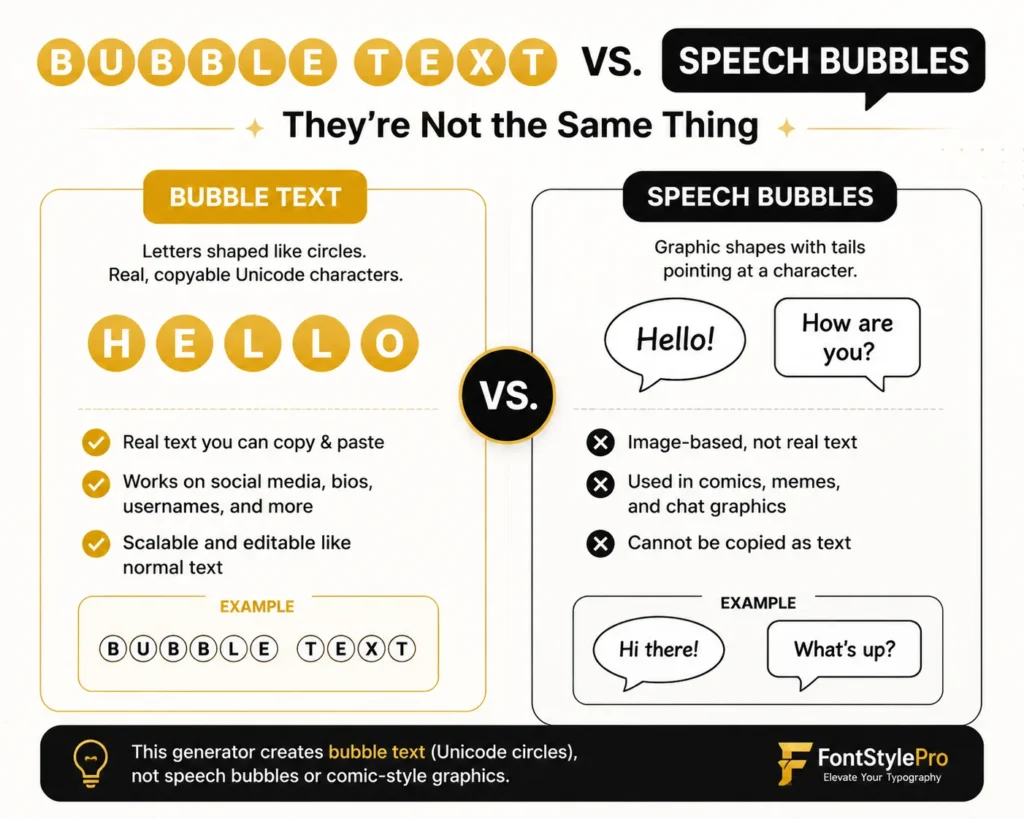
Bubble Text vs. Speech Bubbles: They’re Not the Same Thing
If you landed on a bubble text generator hoping for a comic-style speech bubble graphic with a tail pointing at a character, that’s a different tool. Bubble text refers to letters shaped like circles. Speech bubbles or chat bubbles are graphic shapes used in memes, comics, and messaging app screenshots. This generator makes the first one: real, copyable Unicode letters, not image-based speech balloons.
Beyond Unicode: 3D Bubble Text for Logos, Posters, and Thumbnails
Unicode bubble letters are text, which means they can’t carry gradients, shadows, or a glossy shine. If you want that inflated, 3D balloon look for a YouTube thumbnail, a birthday poster, or a logo, fontstylepro’s Studio tab handles that separately.
The Studio gives you six rendered 3D bubble presets:
These are rendered graphics, not fonts, so there’s no character version of a glossy or gold effect. You download them as a PNG and insert that image into your document, thumbnail, or design. This is the piece most bubble text generator tools skip entirely. They give you either Unicode letters or a graphic maker, never both in one tool.
How to Paste Bubble Text Into Word or Google Docs Without Losing the Style
Bubble text is plain Unicode, so pasting it normally usually works. But if the bubble characters disappear or turn into boxes after pasting into Word, it’s almost always a rich-text paste issue.
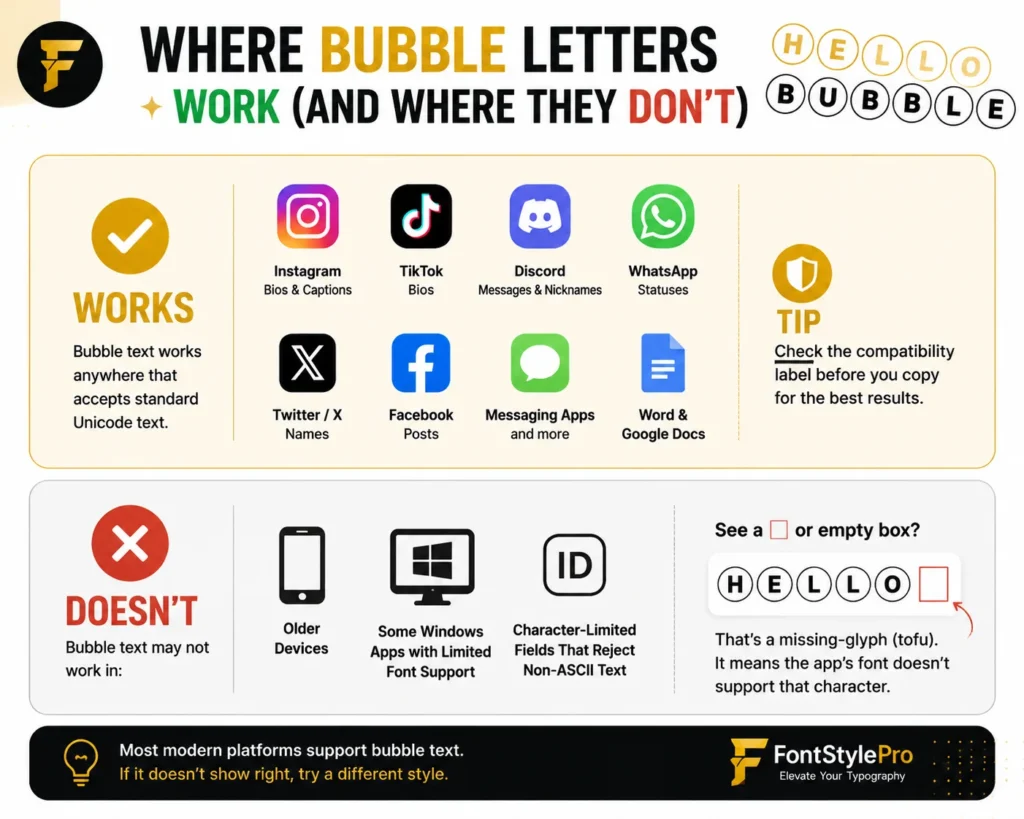
Where Bubble Letters Work (and Where They Don’t)
Bubble text works anywhere that accepts standard Unicode text: Instagram bios and captions, TikTok bios, Discord messages and nicknames, WhatsApp statuses, Twitter/X names, Facebook posts, and most messaging apps. It also pastes into Word and Google Docs, though certain styles render more reliably there than others, which is why checking the compatibility label before you copy saves you a second trip back to the generator.
Where it tends to break down is older devices, some Windows apps with limited font fallback, and character-limited fields that reject non-ASCII text entirely (some usernames or ID fields, for instance). If a letter shows up as an empty box or a “□” shape, that’s called a missing-glyph or “tofu” placeholder. It means the app’s current font doesn’t have an image for that particular Unicode character, not that anything is broken on your end.
Copying Bubble Numbers
Unicode bubble numbers exist too, but they’re limited. Circled numbers only go from 1 to 20 in the standard Unicode set, so you won’t find a native bubble character for something like “47.” For anything beyond 20, you’re better off spelling the number out or using the 3D Studio to render it as a graphic.
Using Bubble Text Without Hurting Readability
Bubble letters are eye-catching, which is exactly why overusing them backfires. A whole paragraph in circled Unicode is genuinely harder to read than plain text, especially for anyone using a screen reader, since accessibility tools often can’t announce enclosed Unicode characters correctly (Web Content Accessibility Guidelines (WCAG) – W3C). Save bubble text for short bursts: a name, a headline, a handful of words in a bio, not full sentences.