TikTok Font Generator: Free Copy-Paste Tool for Stylish Text (2026 Guide)
Type your text in the generator below, pick a style, and copy the result straight into your TikTok bio, caption, or display name. That’s the whole job of a TikTok font generator: it turns plain letters into Unicode characters that look like bold, cursive, bubble, or aesthetic fonts, and every style works the moment you paste it. No app, no download, no login required.
A TikTok font generator converts normal text into stylish Unicode characters you can copy and paste directly into your bio, display name, or captions. It’s free, works instantly on any device, and isn’t the same thing as TikTok Sans (TikTok’s official brand typeface) or the five built-in fonts inside TikTok’s own video editor. All three get lumped together in search results, but they solve different problems, and we’ll break down exactly which one you need below.
How a TikTok Font Generator Actually Works
TikTok doesn’t have a font menu for your bio or display name. There’s no setting anywhere in the app that lets you switch your profile text to italic or cursive. So how does everyone’s bio look so fancy?
It’s a trick, and a good one. Every “font” you see is actually a different set of Unicode characters that happens to look like a styled version of the regular alphabet. Unicode is the character system that powers every emoji, every foreign-language letter, and every symbol your phone can display, and it contains far more characters than the ones sitting on your keyboard. A font generator maps each letter you type to one of those alternate character sets, then hands you the result as plain text you can paste anywhere.
What is a “TikTok font,” technically? It’s not a font file at all. It’s a string of Unicode code points chosen because they visually resemble bold, italic, script, or decorative letterforms. Since it’s just text, it works anywhere Unicode is supported, not only on TikTok.
Because the output is ordinary text under the hood, TikTok’s systems read it exactly like normal characters. It’s searchable, it’s copy-pasteable, and it doesn’t require any special permission or app integration to use. If you also want stylish text for your Instagram profile, try our Instagram Font Generator to create unique fonts for your bio, captions, and username.
Font Styles You Can Generate
A stylish font generator for TikTok usually groups its output into a handful of recognizable categories, and knowing what each one looks like saves you from scrolling through hundreds of options one at a time.
Whether you’re picking out a tiktok caption font generator style for a video description or just refreshing your bio, these categories cover almost everything in the tool above.
TikTok Sans, In-App Fonts, and a Font Generator Are Three Different Things
This is where most guides get sloppy, and it’s the biggest source of confusion in TikTok font searches. If you’ve searched for a tiktok sans font generator, you might actually be looking for something different than a Unicode copy-paste tool. Here’s the breakdown:
| What it is | Where you use it | How to get it | |
| Unicode font generator (this tool) | Styled text made from alternate Unicode characters | Bio, display name, captions, comments | Type, copy, paste. Free, instant. |
| TikTok Sans | TikTok’s real, official brand typeface, released in 2023 and open-sourced by TikTok in July 2025 | TikTok’s own app interface and video overlay text; also usable in your own design projects (CapCut, Canva, websites) | Download the font file free from Google Fonts or TikTok’s GitHub repo |
| In-app TikTok fonts | Five built-in text styles inside TikTok’s video editor: Classic, Neon, Handwriting, Serif, and Typewriter | Text overlays on your actual videos | Tap “Aa” in the TikTok video editor and pick a style |
If you want stylish text for your TikTok bio or username right now, a TikTok Font Generator is exactly what you need. If you’re a designer or brand trying to match TikTok’s actual visual identity in an external project, you want the downloadable TikTok Sans font file instead, since that’s a real, installable typeface rather than copy-paste text. And if you just want your video captions to look different while filming, that’s TikTok’s own built-in editor, not a website at all.
Editing Text in CapCut or InShot?
If you’re not using a TikTok Font Generator for copy-and-paste bio text but instead need a real font file to install in a video editor like CapCut or InShot, a Unicode generator won’t help. A TikTok Font Generator creates stylish Unicode text, while video editing apps require actual font files. For the closest match to TikTok’s native look, download TikTok Sans from Google Fonts, or choose a similar geometric sans-serif font like Montserrat or Open Sans, then install it just like any other custom font in your editing app.
Where You Can Actually Use Stylish Fonts on TikTok
Not every text field on TikTok accepts styled Unicode the same way. This trips people up constantly, especially anyone searching for a font generator for tiktok username specifically.
| TikTok field | Accepts styled Unicode? | Notes |
| Display name / nickname | Yes | Shows on your profile and is what most people mean by “username” |
| @username (handle) | No | TikTok restricts this to letters, numbers, periods, and underscores only |
| Bio | Yes | Watch the character limit (more on that below) |
| Video caption / description | Yes | Works in the written caption field under your video |
| Comments and replies | Yes | Pastes and posts normally |
| In-video text overlay | No, not directly | Use TikTok’s built-in “Aa” text tool instead; pasting styled Unicode there can render inconsistently |
So if you searched for a font generator for a TikTok name hoping to change your actual @handle, that’s the one place it won’t work. Your display name (the one people actually see and that shows up in search) is fair game, and so is your bio. If you’re looking for a more classic or vintage style, you can also try our Old English Generator to create gothic-inspired text that’s perfect for display names, bios, and social media profiles.
How to Add a Stylish Font to Your TikTok Profile or Caption
Copy and paste is really all there is to it. Here’s the full TikTok font generator copy and paste flow, from typing your text to posting it live:
For captions, the process is even simpler: copy your styled text, open the video you’re posting, and paste it straight into the caption field before you post.
Watch Out: Styled Fonts Eat Your Character Limit Faster
Here’s something almost nobody mentions: TikTok’s bio has an 80-character limit, but styled Unicode characters aren’t always counted as one character each. Many stylized letters are encoded as multi-byte characters, so a phrase that looks like 20 letters can quietly use up 40 or more characters worth of your limit.
If your styled bio keeps getting cut off or won’t save, this is usually why. After creating your text with a TikTok Font Generator, paste it into the TikTok bio field and check the live character counter before saving, rather than assuming the visible letter count matches the actual character count.
Best Font Styles for a TikTok Logo or Channel Name
If you’re searching for a tiktok logo font generator, you’re probably trying to make your channel name or handle look like a brand mark rather than plain text. A few style categories work best for that:
Avoid combining more than two font styles in the same name. It stops looking intentional and starts looking hard to read, which defeats the point of a logo-style name in the first place.
Do Fancy Fonts Cause Accessibility Problems?
This one matters, and most TikTok Font Generator pages skip it entirely. Screen readers, which many visually impaired users rely on to browse TikTok, don’t always pronounce styled Unicode characters correctly. Some screen readers will read each character individually, spell out symbols, or skip the text altogether, since the characters technically aren’t letters, they’re look-alike symbols from unrelated Unicode blocks.
That doesn’t mean you should avoid using a TikTok Font Generator altogether. It means you should use them for accents, not for anything a reader genuinely needs to understand, like your actual business name, contact info, or a call to action. Keep critical information in plain text, and save the stylish font for a short bio line or a caption flourish.
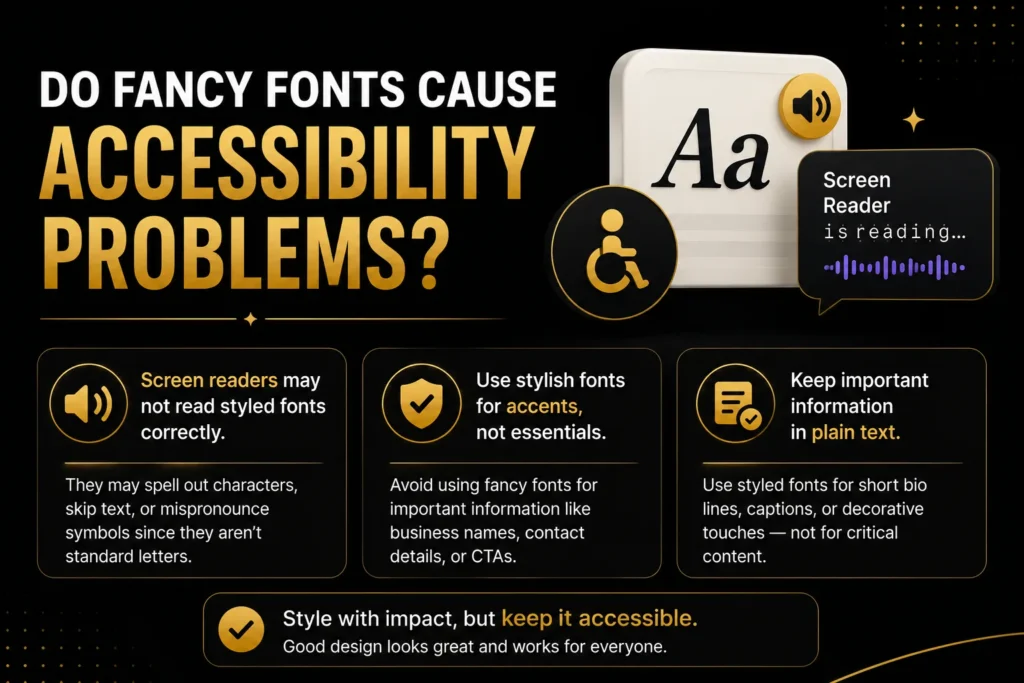
The best way to use a TikTok Font Generator is to enhance short bio lines, captions, usernames, or decorative text while leaving critical information in a standard font. If you want to add extra emphasis without relying only on fancy fonts, you can also use our Underline Text Generator to create underlined Unicode text for bios, captions, and social media posts. This approach keeps your content visually appealing without sacrificing accessibility, readability, or user experience.
Does Using a Stylish Font Affect the TikTok Algorithm?
No, there’s no evidence that styled Unicode text changes how TikTok’s algorithm ranks or distributes your content. What actually affects your reach is watch time, engagement, and completion rate, not the character set in your bio.
Where fonts can help indirectly is first impressions. A profile that looks put-together and easy to scan tends to hold a viewer’s attention a beat longer than one that looks like everyone else’s, and that extra beat is sometimes enough to turn a profile visit into a follow. That’s a design effect, not an algorithm one.
FAQs
Related Text Generators You May Like
Explore more creative text styles with our other tools: