
BGMI Name Style: Create a Stylish BGMI Name in Seconds

Your BGMI name is the first thing anyone sees, before they see your K/D ratio, before they see how you rotate, before anything else. In a lobby of 100 players, a name built from plain letters gets scrolled past without a second glance. A BGMI name style built with symbols, spacing, and font design gets remembered. Sometimes it even gets screenshotted and copied by the next guy in the lobby. This page gives you a working BGMI Name Generator, plus the naming rules, symbol categories, and formatting tricks that actually get accepted in-game, not just the ones that look good in a screenshot on some other site.

Looking for names specifically designed for Battlegrounds Mobile India? Try our BGMI Name Style Generator to create stylish BGMI names with unique fonts, symbols, and copy-paste ready designs.

How to Use This BGMI Name Generator

  • Type your base name (letters and numbers only) into the input box.
  • Browse the generated styles: bold Unicode, bracket-framed, symbol-decorated, and font-swapped variants.
  • Tap a style to copy it. The tool copies the exact Unicode string, not a screenshot, so it pastes correctly the first time.
  • Open BGMI, use a Rename Card, and paste the name into the field.
  • If you get an “invalid character” error, come back and pick a style with fewer or simpler symbols. BGMI’s renderer doesn’t treat every Unicode block the same way.

That last point trips up more players than most guides let on. BGMI’s name field runs on a limited font set, so certain Unicode ranges (heavy math symbols, a few CJK-adjacent glyphs) render as boxes or get rejected outright. A BGMI Name Generator that’s actually worth using tests its output against what the game accepts, instead of dumping every fancy character it can find and letting you find out the hard way.

If you also play Fortnite, try our Fortnite Name Generator to create cool, OG, and stylish usernames in seconds.

Why Your BGMI Name Style Matters

BGMI has been downloaded well over 100 million times, which means your username is competing for attention against a genuinely massive pool of “ProGamer123” and “xXKillerXx” clones. A distinct BGMI name style earns you three things a plain one won’t:

  • Recognition. Squadmates and rivals remember a name with a visual hook faster than a generic word.
  • Perceived skill. Top ranked players and esports orgs almost all run styled names. A clean symbol name quietly signals you’ve been in the game long enough to know how things work.
  • Search and social carryover. The same styled name doubles as your Instagram bio, Discord tag, and YouTube handle, so you’re building one identity instead of five different ones.

None of that requires overdoing it. One well-placed symbol pair usually beats five random ones stacked together, and that’s really the whole philosophy behind a good BGMI name style.

If you prefer a nostalgic, aesthetic look, our Vaporwave Text Generator lets you transform your BGMI name into stylish retro text with one click.

How to Create an Enticing Post with the BGMI Stylish Name Generator Tool

A BGMI stylish name isn’t only for the game client. Plenty of players reuse the same generator to write eye-catching bios, match-highlight captions, and clan recruitment posts. Two techniques cover most of what you’ll actually need.

Star Decorate Symbols to Write Social Media Profile Names

Star and line symbols (★, ☆, ✯, ⋆, ▬, ═) work as visual brackets around a name, the same way asterisks work in plain text, except they carry more visual weight. A profile name like ★彡 RATHOR 彡★ reads as a finished logo rather than a username someone typed in thirty seconds. The pattern worth following: pick one symbol pair, keep it identical on both sides, and don’t mix more than two symbol families into a single name. Three is where it starts looking messy.

Emoticon Symbols and Font Designs to Write Posts

Emoticon-style Unicode (ツ, ㅤ, 乂, 灬) came out of Japanese and Korean typing culture and made its way into gaming through PUBG PC clans years before BGMI even existed. Paired with a Unicode Mathematical Alphanumeric font swap (turning “RAJA” into “𝕽𝕬𝕵𝕬” or “RAJA”), it gives a post or bio a designed look without touching an image editor. These are real Unicode code points, not a custom font file or an image, so they render the same way across apps: the same approach behind most Unicode text tools you’ve probably already used.

Symbol TypeExamplesBest Used For
Star & line brackets★彡, 卍, ▬▬▬Framing a name on both sides
Emoticon glyphsツ, ㅤ, 灬, 乂Adding personality or mood
Font swaps𝕭𝖔𝖑𝖉, 𝑰𝒕𝒂𝒍𝒊𝒄, FullwidthReplacing the base letters entirely
Zero-width spacingU+200B, U+3164Creating gaps a normal spacebar won’t allow

From gaming names to professional documents, Font Style Pro offers tools for every purpose. Check out our Resume Font Generator to find resume-friendly font styles.

Why Use Our BGMI Name Style Tool?

Most BGMI name generator pages either dump a static list you have to scroll through, or generate styles without checking whether BGMI’s client actually renders them. This BGMI name style tool is built differently:

  • Every symbol and font style is checked against characters that actually display inside BGMI’s name field, not just inside a browser window.
  • Output respects the game’s character cap, so you’re not stuck manually trimming symbols after a rejected name.
  • One click copies the exact string, which avoids the broken-character issue you get from copying fancy text out of a PDF or a screenshot-based list.
  • Styles cover boys, girls, clan tags, and squad naming conventions in one place instead of scattered across four different pages.

BGMI Name Ideas for Boys, Girls, Clans & Squads

A good BGMI name style should match the identity you’re actually going for. A few starting patterns that hold up well:
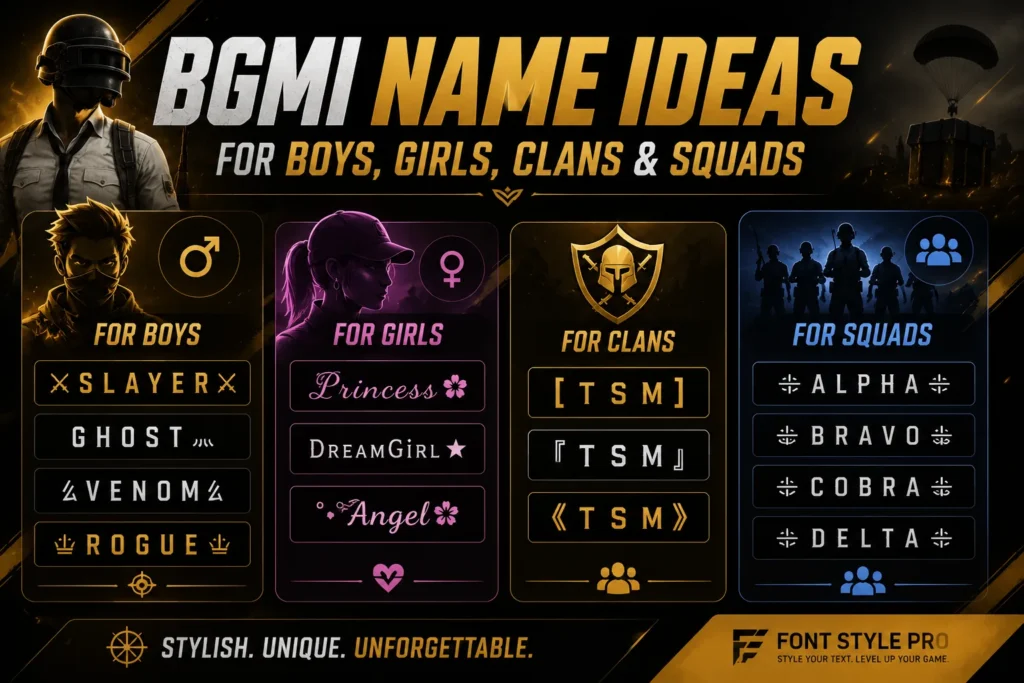
  • For boys: aggressive, short, single-word bases tend to work best. Think “SLAYER,” “GHOST,” “VENOM,” decorated with sharp symbols like 乂 or 灬.
  • For girls: softer font swaps (fullwidth or script-style Unicode) paired with a single star or flower symbol usually read as polished rather than cluttered.
  • For clans: keep one fixed tag, two to four characters, that every member pastes at the start or end of their BGMI ID names. Something like “[TSM]” or “『TSM』” makes squad members instantly identifiable in the kill feed.
  • For squads: a shared symbol pair with each player’s individual name in the middle keeps the whole squad’s BGMI ID names looking consistent, without forcing identical names, which BGMI blocks anyway.
BGMI Name Ideas for Boys and Girls

How to Do a BGMI Name Change

You need a Rename Card to make a BGMI name change. Typing a new name directly in Settings won’t work, unless you’re using the one-time free change new accounts get. Here’s the actual process:

  • Get a Rename Card. You’ll either receive one free (new accounts, Royale Pass rewards, event missions) or buy one from the in-game shop for 180 UC.
  • Open BGMI and go to your Inventory.
  • Find the Rename Card and tap Use.
  • Type or paste your new BGMI stylish name into the text field.
  • Tap OK, then confirm. The name updates instantly if it’s valid and not already taken by someone else.

A few limits worth knowing before any BGMI name change:

  • Keep names within 16 characters, spaces and symbols included. Some listings cap it lower at 14, so if your style is symbol-heavy, leave yourself a couple of characters of buffer just in case.
  • A plain space from your keyboard is usually rejected. Players get around this with invisible Unicode characters (the Hangul Filler, U+3164, is a common one) to create a visual gap.
  • Duplicate names aren’t allowed, so a name that looks free on a generator list might already be taken in-game. You won’t know until you try it.
  • Names can’t contain profanity, impersonate official accounts, or use copyrighted terms. The game won’t tell you exactly what went wrong, it just throws an “invalid character” or “name already taken” error, so if a name fails, try swapping the symbol set before assuming the base word itself is the problem.

Tips for Picking the Best BGMI Name

  • Test readability at small size. Names render tiny on the kill feed and scoreboard. If you can’t read your own name at 50% zoom, nobody else can either.
  • Use capital letters for your base word. Lowercase gets lost faster in the compressed UI font BGMI uses.
  • Stick to one symbol theme. Mixing stars, emoticons, and a font swap in the same BGMI name style almost always looks cluttered instead of stylish, even when each piece looks good on its own.
  • Save a backup name. Since duplicates aren’t allowed, have a second and third choice ready before you spend a Rename Card on the first one that gets rejected.
  • Match your name across platforms. Reuse the same BGMI stylish name for Discord, Instagram, and YouTube so viewers can actually find your other accounts by searching the exact string.

FAQs

BGMIKING is a naming pattern players reuse across BGMI, PUBG Mobile, Discord, YouTube, and Instagram to keep one consistent gaming identity across platforms. It’s not tied to a specific in-game feature, it’s just a brand players build once and carry everywhere.

Add a symbol pair or font swap around the base word, something like “★彡 BGMIKING 彡★” or “乂BGMIKING乂,” and adjust the exact combination until the name isn’t already taken. BGMI blocks exact duplicates, so uniqueness usually comes down to the symbols you wrap around it, which is exactly what a good BGMI Name Generator helps you test.

Most of the Unicode symbols and font styles generated here are accepted, since they’re standard Unicode code points rather than custom fonts or images. A small number of Unicode ranges aren’t supported by BGMI’s renderer, which is exactly why it’s worth testing a style before you commit a Rename Card to it.

A regular keyboard space is usually rejected by BGMI’s name field. Players work around this with invisible Unicode spacing characters, like the Hangul Filler or a zero-width space, placed between words to create a visual gap the game will actually accept as valid text.

Conclusion

A strong BGMI name style really comes down to three choices: a short, readable base word, one symbol theme instead of several, and a name that fits comfortably under the character cap with room to spare. Test a few combinations in the BGMI Name Generator above, confirm the one you like isn’t already taken, and spend your Rename Card once instead of three times. Get the BGMI name style right the first time, and you won’t need to touch it again for a long time.