Weird Text Generator: Copy and Paste Zalgo, Glitch, and Unicode Styles
Paste your text into a weird text generator and you’ll get dozens of wild styles back in seconds: everything from glitchy Zalgo corruption (l̸̡̟̋i̴̘͝k̷̗͑e̵̢͐ ̵̢̕t̸̗̀h̶̰͝i̵̖̾s̶͍̈) to clean Unicode swaps like 𝔴𝔢𝔦𝔯𝔡 𝔱𝔢𝔵𝔱 and weird text. If you’re specifically looking for distorted, horror-style Unicode effects, try our Glitch Text Generator, which focuses on creating customizable Zalgo and corrupted text styles. No download, no account. Just type, pick, and copy.
A weird text generator converts normal letters into unusual Unicode characters and diacritics. The output is real text, not an image, so you can paste it into Discord usernames, Roblox bios, Instagram captions, WhatsApp status lines, PUBG clan tags, and more. It works instantly in your browser on any device.
What Is a Weird Text Generator?
A weird text generator is an online tool that maps your standard keyboard characters to unusual Unicode symbols, making your text look strange, stylized, or corrupted. The results aren’t fonts you install. They’re actual characters from the Unicode standard, which means they paste as text anywhere that supports Unicode rendering.
There are two completely different things people call “weird text,” and it matters which one you want:
Weird Unicode font text
Your letters get swapped for visually similar Unicode characters from other scripts or mathematical blocks. Example: w becomes 𝔴 or w. The text stays readable. Styles include Gothic/Fraktur, Wide (vaporwave), Cursive, Bubble, Bold, Italic, and more.
Zalgo / glitch text
Your letters stay, but dozens of diacritic marks get stacked above, through, and below each character. Example: w becomes w̸̴͐̈. The text looks corrupted or haunted. This is what most people mean when they search for a “weird text generator glitch.”
Both come from Unicode. The mechanism is different. The use case is often different too.
How Zalgo Text Actually Works
The weird glitch effect comes from a quirk in Unicode’s design. Unicode needed to handle languages that build characters by stacking marks: accents in French, dots in Arabic, tildes in Portuguese. To do that, it lets you attach “combining diacritical marks” to any character, with no official limit on how many.
Someone figured out you can exploit that. Stack 40 combining marks on a single letter and it starts to overflow above and below the line, looking like the text is breaking apart. That’s Zalgo. It’s not a glitch, not a software bug. It’s completely intentional (and technically valid) Unicode.
The name comes from an internet horror meme: “Zalgo” is a fictional entity associated with corruption and chaos. The text aesthetic fit the theme, and the name stuck. You’ll also see it called glitch text, cursed text, creepy text, and corrupted text. Same thing, different names depending on the community.
Weird Text Styles: Which One Do You Need?
Here’s a practical comparison so you can pick the right style for your situation:
| Style | How it works | Best for | Readable? |
| Zalgo (glitch) | Diacritic marks stacked on each letter | Horror themes, creepypasta, Discord server aesthetics, shock effect | Depends on intensity |
| Gothic / Fraktur | Unicode medieval script characters | Dark usernames, gaming clans, aesthetic bios | Yes |
| Wide / Vaporwave | Full-width Unicode (abc) | Aesthetic content, TikTok bios, lo-fi vibes | Yes |
| Cursive / Script | Unicode italic-script characters (𝒶𝒷𝒸) | Instagram bios, feminine aesthetics | Yes |
| Bubble text | Circled Unicode letters (ⓐⓑⓒ) | Casual fun, captions, cute profiles | Yes |
| Upside-down | Mirrored/rotated Unicode | Pranks, weird humor, surprise effect | Sort of |
| Strikethrough | Combining strikethrough mark | Social media, ironic commentary | Yes |
| Small caps | Unicode small capital letters (ᴀʙᴄ) | Formal-looking usernames, subtle styling | Yes |
Rule of thumb: If you want to look stylish and stay readable, use a Unicode font style. If you want to look haunted or corrupted, use Zalgo, but keep the intensity low if people need to actually read your username.
How to Use the Weird Text Generator on FontStylePro
It takes about ten seconds:
That’s it. Nothing to install, no sign-up, no watermarks.
Platform-by-Platform Guide: Where Weird Text Works (and Where It Doesn’t)
This is the part almost nobody covers properly. The text generates fine. The real question is whether it’ll render correctly where you need it.
Discord
Discord handles Unicode very well. Zalgo text, Gothic, Cursive, Wide, Bubble: all of it displays correctly on both desktop and mobile. Use weird text in:
Zalgo looks especially striking against Discord’s dark theme. Even heavy Zalgo renders without breaking the UI. The one thing to watch: very heavy Zalgo in dense text channels can make messages hard to read, so use it intentionally.
Roblox
Roblox supports Unicode, but it has a content filter that can block or strip certain characters, especially in usernames. Here’s what works and what doesn’t:
Tip: Always generate your weird text, then test it directly in Roblox before you commit. If the display name field rejects it, dial back to a lighter style or switch to a clean Gothic or Cursive font instead.
Minecraft
Minecraft supports Unicode characters in most text fields. You can use weird text in:
In-game chat is more variable; it depends on the server’s configuration. Some servers strip combining marks (which kills Zalgo), while others render it fine. For book text and signs, full Unicode works without issue.
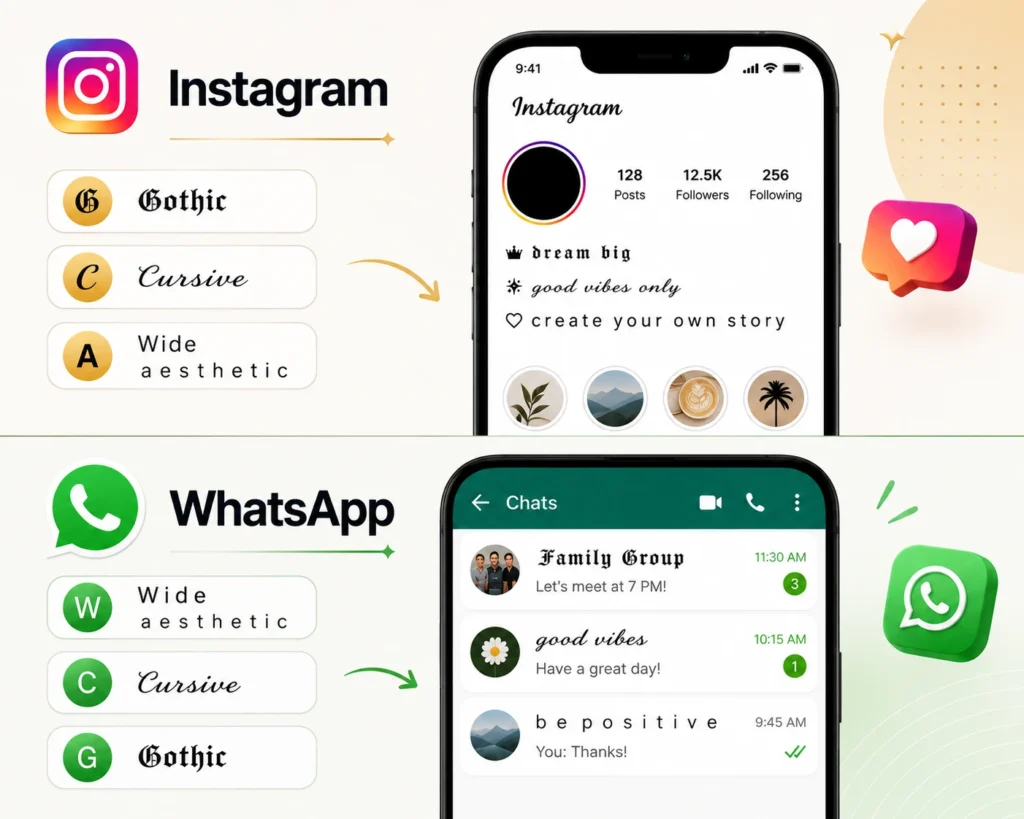
Instagram bios and captions fully support Unicode fonts, making it one of the most popular platforms for stylish text. Whether you’re creating Gothic 𝔟𝔦𝔬𝔰, cursive 𝓬𝓪𝓹𝓽𝓲𝓸𝓷𝓼, or wide aesthetic text, everything renders correctly on both Android and iPhone. If your goal is to make your profile stand out, try our Instagram Bio Font Generator to create unique bio text that’s ready to copy and paste. The only exception is that Instagram may strip heavy Zalgo text in comments, although it usually displays correctly in bios.
WhatsApp renders Unicode fonts cleanly in messages, statuses, and group names. Wide text, Cursive, and Gothic all display correctly. Create stylish medieval text with our Gothic Font Generator for a unique look. Heavy Zalgo can look messy in dense conversation threads, but light Zalgo and other Unicode font styles work perfectly.
PUBG Mobile, Free Fire, COD Mobile
Gaming name fields in these titles support Unicode characters but have character limits and sometimes filters. Gothic and Small Caps work best for gaming clan tags and names, so they’re readable but visually distinct. Zalgo tends to get either filtered out or looks too chaotic to read quickly in a lobby.
Best picks for BGMI/Free Fire names: Gothic (𝔓𝔯𝔬𝔤𝔞𝔪𝔢𝔯), Small Caps (ᴘʀᴏɢᴀᴍᴇʀ), or Wide (PROGAMER). All three look sharp on leaderboards and pass most name filters.
TikTok and YouTube
Both platforms handle Unicode well in bios, channel names, and descriptions. Comments sometimes strip unusual characters depending on the app version, so use cleaner styles for comment sections and save the heavy Zalgo for static fields like your bio.
Quick Compatibility Reference
| Platform | Unicode font styles | Light Zalgo | Heavy Zalgo |
| Discord | ✅ | ✅ | ✅ (use sparingly) |
| Roblox username | ✅ | ⚠️ test first | ❌ usually rejected |
| Roblox bio | ✅ | ✅ | ⚠️ may get filtered |
| Minecraft signs | ✅ | ✅ | ⚠️ server-dependent |
| Instagram bio | ✅ | ✅ | ⚠️ may strip |
| ✅ | ✅ | ⚠️ looks messy | |
| PUBG / Free Fire | ✅ | ⚠️ test first | ❌ usually filtered |
| TikTok bio | ✅ | ✅ | ⚠️ variable |
| YouTube bio | ✅ | ✅ | ⚠️ variable |
Zalgo Intensity: Light, Medium, or Heavy?
One detail most generators don’t explain: Zalgo text has an intensity setting, and it matters a lot.
Light Zalgo adds just a few marks above and below each letter. The text stays mostly readable. This is the right choice for Roblox bios, gaming names, and anywhere people actually need to read what you wrote.
Medium Zalgo gets noticeably chaotic. Text starts to overflow lines on some platforms. Good for Discord server aesthetics, horror-themed usernames, and social media captions where the creepy effect is the point.
Heavy Zalgo is barely readable. It’s dramatic and attention-grabbing, but you lose legibility fast. Use it for decorative purposes: a banner, a horror-themed bot message, a meme. Not for something people need to actually read.
A good approach for gaming names: apply Zalgo only to the first letter, then use a clean Gothic or Wide font for the rest. You get the corrupted aesthetic without sacrificing readability.
Why Weird Text Isn’t a Font File
This confuses a lot of people. These aren’t fonts you install. There’s no .ttf or .otf file involved. What the weird text generator produces is just regular text: Unicode characters that happen to look unusual.
When you paste 𝔴𝔢𝔦𝔯𝔡 somewhere, you’re pasting five individual Unicode characters, not a styled version of the word “weird.” That’s why it works everywhere without any setup. It’s also why the text sometimes looks slightly different between Android and iOS, or between Chrome and Safari, because different operating systems render Unicode characters with their own font system, so minor visual differences are normal.
If a platform shows your text as boxes (□ □ □), it means that the device’s font doesn’t include those specific Unicode characters. This is rare on modern devices but can happen on older Android versions or some niche apps. Switching to a more common style (Bold Unicode or Small Caps, rather than obscure mathematical symbols) usually fixes it.
Weird Text Generator vs. LingoJam: What’s the Difference?
LingoJam’s weird text generator is probably the most well-known version of this tool. It’s been around for years, it’s simple, and it does one thing: Zalgo text. One input box, one Zalgo output.
FontStylePro’s weird text generator gives you multiple styles in one place (Zalgo, Gothic, Cursive, Wide, Bubble, Strikethrough, Small Caps, and more), so you can compare and pick the style that fits your actual use case. You’re not limited to glitch-style output if what you actually need is a clean Gothic font for a Roblox username.
Both tools use Unicode. The difference is range and usability.
Frequently Asked Questions
All styles on FontStylePro use standard Unicode characters. No installation required. Output is copy-paste ready for Discord, Roblox, Instagram, WhatsApp, TikTok, PUBG, Free Fire, and any other app that supports Unicode text.