Handwriting Font Generator: Turn Any Text Into Handwritten-Style Fonts
A handwriting font generator turns plain typed text into handwritten-style characters you can copy and paste anywhere text works: Instagram bios, Discord names, TikTok captions, Google Docs, you name it. No downloads, no sign-ups, no design software. You type, it converts, you copy.
If that’s what you’re after, you’re in the right place. If you actually want to turn your own handwriting into a real, installable font file, that’s a different kind of tool, and we’ll point you in the right direction for that too.
This handwriting font generator converts your text into real fifteen handwriting styles using Unicode characters, real characters that already exist in the Unicode standard, not image files or custom fonts you have to install. Type your text once, browse the styles, and copy whichever one you like straight into any app that accepts text. It works on desktop and mobile, and it’s free.
Create stylish italic text for Instagram, Discord, TikTok, Facebook, and more with our Italic Text Generator
What a Handwriting Font Generator Actually Is
Here’s the part most sites skip: a handwriting font generator online doesn’t create a new “font” in the technical sense. It swaps your regular letters for lookalike Unicode characters that already exist in the Unicode standard, things like mathematical script letters or specialized symbol sets that happen to resemble cursive or handwritten strokes.
That’s why the output pastes perfectly into a text box but won’t show up if you try to use it as an actual font in a design program. It’s text, not a typeface file. Once you get that distinction, the whole tool makes a lot more sense.
A handwriting font generator (copy-paste type) is a web tool that converts normal typed text into decorative Unicode characters styled to look like handwriting, cursive, or calligraphy. The output is plain text you copy and paste, also you can download your text into image file.
Unicode Text vs. Image Output vs. Real Fonts
This is the single biggest source of confusion in this space, and almost nobody explains it clearly. There are three completely different tools that all get called “handwriting font generator,” and they do different jobs.
| Type | What you get | Where it works | Installable? |
| Unicode copy-paste generator (this tool) | Styled text characters | Anywhere you can paste text: bios, captions, chats, docs | No, it’s text, not a file |
| Text-to-image generator | A PNG or SVG image of your text | Anywhere images work: cards, printables, graphics | No, it’s a picture, not a font |
| Handwriting-to-font tool | A .ttf or .otf font file made from your handwriting | Any app that lets you install and select fonts | Yes, that’s the whole point |
If you’re trying to spice up a bio or a caption, you want the first one, which is what this page covers. If you want a printable card with handwritten-looking text, you want the second. If you want your own handwriting turned into a font you can type in Word or Canva, look at a tool built for that specific job, that’s a different workflow involving scanning or drawing letters.
Want your TikTok bio to stand out? Try our TikTok Font Generator to create stylish copy-and-paste fonts instantly.
How to Use a Handwriting Font Generator (Copy and Paste)
Using a handwriting font generator copy and paste tool takes about ten seconds once you know the steps.
That’s it. There’s nothing to install and nothing to configure.
Copying and Pasting on Mobile
Mobile works a little differently than desktop, and this trips people up more than anything else on this kind of tool.
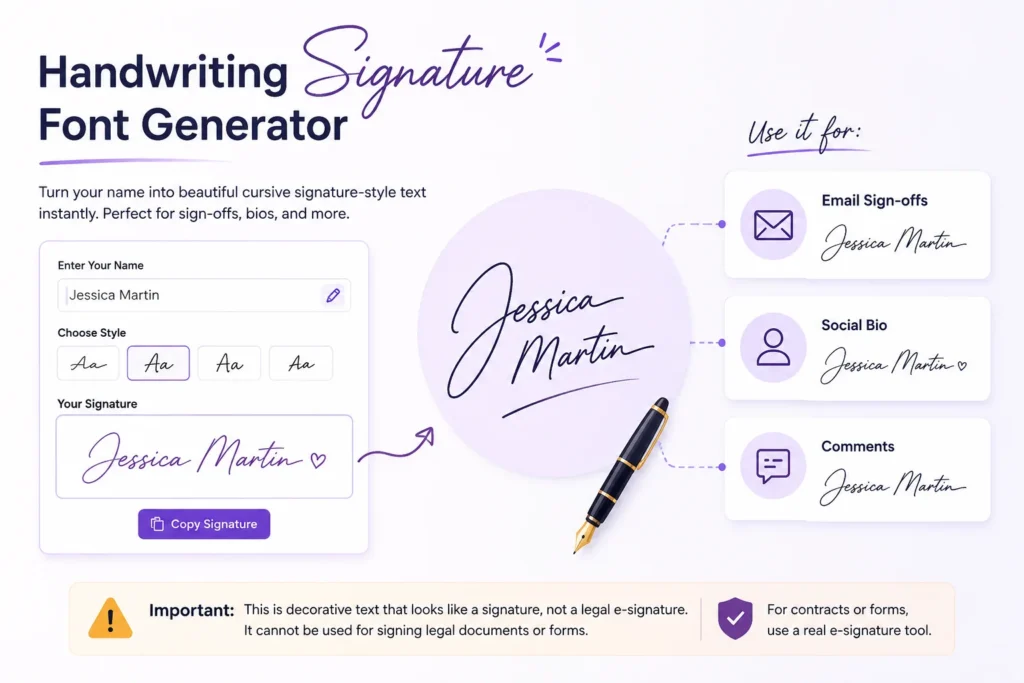
Handwriting Signature Font Generator
A handwriting signature font generator gives you cursive-style Unicode text that mimics the flowing, connected look of an actual signature, useful for sign-offs, email footers, or making a name look personal in a bio or comment.
It’s worth being clear about what this isn’t: it’s not a legal e-signature and it won’t work for signing documents that require an actual handwritten or verified digital signature. It’s decorative text that looks like a signature, nothing more. For contracts or forms, you’ll need a real e-signature tool instead.
Want a unique Roblox username or display name? Use our Roblox Font Generator to create stylish Unicode fonts you can copy and paste for your profile, bio, and in-game chat.
Calligraphy Handwriting Font Generator
Calligraphy-style output leans more formal and ornate than plain cursive: think wedding invitations, elegant quote graphics, or a fancier feel for a brand bio. A calligraphy handwriting font generator typically pulls from Unicode script character sets designed to look closer to pen-and-ink lettering, with more flourish in the letterforms than a standard cursive style.
It reads best in short bursts. Long paragraphs in calligraphy-style Unicode get harder to read fast, so it works better for a name, a title, or a short line than a full caption.
Cursive Handwriting Font Generator
Cursive is the most requested style in this category, and for good reason: it’s the closest thing to how actual handwriting looks, with connected, flowing letters. A cursive handwriting font generator is what most people picture when they search this term at all, script-style text for bios, captions, and comments.
If you’re comparing it to a plain “cursive font generator,” the output overlaps heavily. The handwriting-specific framing usually just means the site groups multiple handwriting-adjacent styles, cursive, script, signature, calligraphy, together in one place instead of splitting them across separate pages.
Fancy Handwriting Font Generator
“Fancy” here just means decorative rather than a single specific style — it can include loopy script, bold cursive, delicate thin strokes, or stylized letterforms that don’t map neatly to “cursive” or “calligraphy.” A fancy handwriting font generator is really just this same tool with a broader style net, useful when you want something that looks distinct without committing to one specific handwriting look.
Child Handwriting Font Generator: Two Different Things
This one’s genuinely ambiguous, so let’s clear it up. “Child handwriting font generator” usually means one of two things.
If you just want typed text that looks casual and kid-drawn for a card or project, you’re in the right place. If you want to preserve your actual child’s handwriting forever, you’ll need the second kind of tool.
Why Your Text Sometimes Shows Up as Boxes
If you’ve ever pasted styled text somewhere and gotten a row of little squares instead of letters, that’s not a bug in the generator. It means the app or website you pasted into is using a font that doesn’t include the specific Unicode characters the generator used.
This happens most often in older apps, certain fields inside business software, or platforms with strict text filtering. There’s no fix on your end beyond trying a different style, since some Unicode character sets have broader support than others. If one style breaks, try a simpler cursive or script option instead of a heavily stylized one.