Glitch Text Generator: Copy & Paste Corrupted Text for Roblox, Minecraft & More
A glitch text generator is a free online tool that converts normal text into distorted, corrupted-looking characters you can copy and paste anywhere: Discord bios, Roblox usernames, Instagram captions, Minecraft chat, you name it. It works by stacking special Unicode symbols (called combining diacritical marks) on top of your letters to create that broken, glitched-out look.
Type your text into the generator below, pick an intensity level (light to extreme), and hit copy. The output is real Unicode text (not an image), so it pastes directly into social media profiles, game usernames, and messaging apps on any device.
What Is Glitch Text, Exactly?
Glitch text is normal text transformed to look digitally corrupted by overlaying Unicode combining characters above, below, or through each letter. The result looks like a software error or a corrupted file, but it’s just regular text your keyboard can’t type.
It’s not a font file you install. There’s nothing to download. The characters are part of the Unicode standard, which means they render on virtually every modern phone, computer, browser, and app. No special software needed.
You’ve probably seen it used in horror game aesthetics, creepypasta forums, edgy Discord usernames, or Halloween posts. That “my text is melting” look is called Zalgo text, which is the most extreme version of the glitch style. More on that in a second.
Want an even more subtle style? Try our small text generator to create tiny Unicode text for social media bios, usernames, and messages.
Glitch Text vs. Zalgo Text vs. Corrupted Text: What’s the Difference?
People use these terms interchangeably, but they’re not quite the same thing:
| Term | What It Looks Like | How Intense | Common Use |
| Glitch text | Letters with light distortion marks | Low–Medium | Usernames, bios, captions |
| Corrupted text | Similar to glitch; slightly more garbled | Low–High | Gaming, horror themes, aesthetics |
| Zalgo text | Letters “dripping” with marks above and below | Medium–Extreme | Creepypasta, horror, shock value |
Glitch text is the umbrella term. Zalgo is a specific variant that stacks diacritical marks so heavily the text appears to overflow the line above and below it. The name comes from a 2004 internet meme involving a chaotic entity called Zalgo. The corrupted, disintegrating text style was used to represent his presence in horror comics. It stuck.
Corrupted text is more of an aesthetic label than a technical one. It just means text that’s been deliberately broken to look like a system error.
For copy-paste purposes, all three work the same way. The difference is just how heavy the effect is.
How to Use the Glitch Text Generator
That’s it. The output is standard Unicode text, so no app or platform needs to “support” glitch text specifically. If it supports text, it supports this.
Platform Compatibility Guide: What Actually Works Where
This is the part most guides skip. Knowing where your glitch text will render correctly (and at what intensity) saves you a lot of frustration.
| Platform | Light Glitch | Medium Glitch | Heavy Zalgo | Notes |
| Roblox username | ✅ Works | ⚠️ May filter | ❌ Usually rejected | Roblox filters heavy Unicode in usernames |
| Roblox bio/description | ✅ | ✅ | ✅ | Bios are far more permissive |
| Discord display name | ✅ | ✅ | ⚠️ Limited | Some combining chars are stripped |
| Discord bio/About Me | ✅ | ✅ | ✅ | Full support |
| Minecraft Java (chat) | ✅ | ✅ | ✅ | Good Unicode support |
| Minecraft Bedrock (chat) | ✅ | ⚠️ | ❌ | More restricted Unicode rendering |
| Instagram bio | ✅ | ✅ | ✅ | 150 character limit applies |
| TikTok bio | ✅ | ✅ | ⚠️ | Heavy Zalgo may display oddly |
| Twitter / X bio | ✅ | ✅ | ✅ | 160 char limit; Zalgo chars count extra |
| WhatsApp / Telegram | ✅ | ✅ | ✅ | Full Unicode support |
| Steam profile | ✅ | ✅ | ✅ | Generally permissive |
Key rule of thumb: For usernames and display names, use Light or Medium. For bios, descriptions, and posts, you can go as heavy as you want.
Also worth knowing: Unicode combining characters can count as multiple characters toward a platform’s limit. If your bio keeps getting cut off, that’s probably why. Dial back the intensity or shorten the text.
Glitch Text Generator for Roblox
Roblox has a younger, creative player base that loves unusual usernames, so “glitch text generator Roblox” is one of the most common things people search for on this topic.
Here’s what actually works:
For Roblox usernames: Stick to Light intensity. Roblox’s username filter blocks most heavy combining characters. Many Zalgo-style names get rejected during signup. Light glitch often sneaks through because the marks are subtle enough to pass validation.
For Roblox display names and group descriptions: Go as heavy as you want. These fields don’t go through the same character filtering, and they’re what other players actually see when they look at your profile.
For Roblox chat: Medium works fine on most servers. Heavy Zalgo can make your messages unreadable and might get you muted, not for any rules violation, just because it’s annoying.
Ready-to-copy Roblox glitch username ideas
Try pasting these into our generator at Light intensity for a usable, filtered-friendly result:
Glitch Text Generator for Minecraft
Minecraft is a bit different because the game has its own built-in text formatting system that can create a native glitch effect, separate from Unicode copy-paste glitch.
Method 1: Unicode copy-paste (Java + Bedrock)
This is what our generator produces. On Java Edition, Unicode rendering is solid and Medium or even Heavy glitch text pastes fine into chat, books, and signs. On Bedrock Edition, heavy combining characters often don’t render correctly and show as squares or get stripped. Stick to Light or Medium for cross-version compatibility.
Method 2: Minecraft’s native §k formatting code (Java only)
Java Edition has a built-in “obfuscated” text effect triggered by the §k formatting code. It makes characters flicker rapidly and randomly. It’s not copy-paste glitch, but it’s the closest thing to an animated glitch effect Minecraft can actually do natively.
Example in chat: §k§4[ERROR]§r §cSystem failure detected
You can use §k in signs, books (/give with NBT), command blocks, and /tellraw JSON commands. It’s particularly effective for horror adventure maps or server event messages.
Method 3: /tellraw with JSON (Java, server owners)
If you run a Minecraft server, /tellraw lets you combine obfuscated text, colors, and normal text in the same message, giving you way more control than § codes alone. It’s beyond the scope of this page, but worth knowing if you’re building an adventure map and want full “corrupted transmission” vibes.
What “Animated” Glitch Text Actually Means (And What You Can Copy)
Fair warning: this trips a lot of people up.
When you search for an animated glitch text generator, you’re probably expecting text that flickers or shifts when you paste it. That’s not how copy-paste Unicode works. No matter how wild the glitch effect looks in a tool’s preview, what you actually copy is static Unicode text. The “animation” in most tools is CSS applied to the preview box. It doesn’t travel with the characters.
Here’s what is possible:
If you specifically need an animated GIF of glitch text, tools like MockoFun or EZGIF let you create one. For plain copy-paste use, the static Unicode output is what you want and it works everywhere.
Where to Use Glitch Text: Ideas by Context
Gaming profiles Roblox usernames and bios, Discord display names and “About Me” sections, Steam profile descriptions, Epic Games display names. Medium intensity is the sweet spot here, readable but clearly styled.
Social media Instagram and TikTok bios look great with light-to-medium glitch text. It stands out in a feed full of plain text profiles. Twitter/X handles it well too, though watch the character count.
Creative writing & content Creepypasta stories, horror ARG (alternate reality game) posts, Reddit horror threads, YouTube video titles for horror content. Heavy Zalgo works well here because readability matters less than atmosphere.
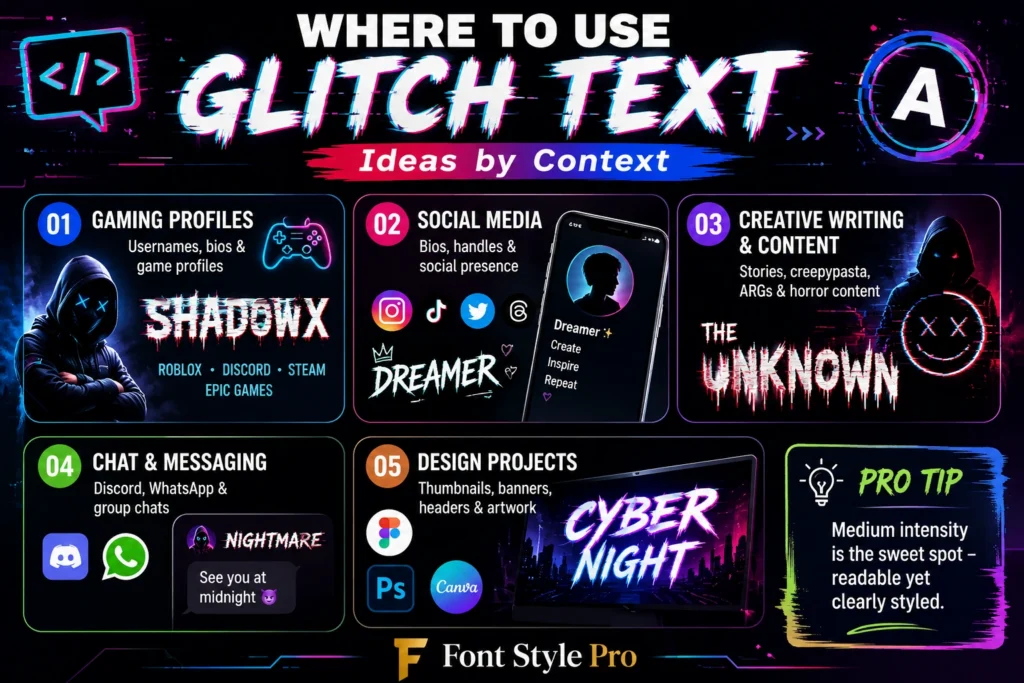
Chat and messaging Discord servers with a horror or cyberpunk theme, WhatsApp group chats for Halloween. Keep it Medium. Too heavy and nobody can read it.
Design projects If you’re designing a thumbnail, banner, or header and want a glitch aesthetic, use the static Unicode text as your starting point in Figma, Canva, or Photoshop. You can then add CSS or layer effects on top.
A Quick Note on theon the Unicode Technical Side
You don’t need to know this to use the generator, but it helps explain why glitch text is both universal and weird.
Every Unicode character has a code point. The Combining Diacritical Marks block (U+0300–U+036F) is a set of characters specifically designed to stack on top of other characters, originally to handle accents in languages like French (é) or Spanish (ñ). Glitch text “abuses” this by stacking dozens of these marks on a single letter, forcing them to overflow the normal text boundaries.
Because they’re standard Unicode, every modern operating system, browser, and app knows what to do with them. That’s why you can paste glitch text into a Google Doc, a Minecraft sign, a Roblox bio, and a tweet without anything special installed.
The chaos level slider in our generator controls how many of these marks get stacked. Light = a handful. Extreme = dozens per letter, which produces full Zalgo overflow.
Pre-Made Glitch Text Examples: Just Copy These
No need to type anything. Grab these ready-made examples:
Light glitch (readable, username-safe): g̈l̈ï̈ẗc̈ḧ / ẽrrõr / v̈öïd
Medium glitch (striking, bio-friendly): g͓̽l͓̽i͓̽t͓̽c͓̽h͓̽ / ē̸r̸r̸o̸r̸ / c̴o̴r̴r̴u̴p̴t̴e̴d̴
Heavy Zalgo (maximum chaos): g̷̡̛͈̱̮̼͋̀̈́͘l̵̨̛̯̠̑̀̑̕ì̸̩͙͈̻͑̕t̴̢̨̛̝͎̒̐͠c̷̱͈̎̀̔̕h̵̡̠͇̻̔̓̚͝ / Ẹ̶̡̛̖̎̀̈́R̸̡̛̻͇̒̑͠R̶͕͈͖̔̐̕͜O̸̡̙͇̓͘R̸̗̩̻͋̓̕
FAQ
All glitch text produced by FontStylePro uses Unicode combining characters (U+0300–U+036F and related blocks). Output is compatible with any Unicode-supporting platform. No account or download required.