Underline Text Generator: Copy, Paste, Underlined Text Anywhere
Underline text generator tools convert normal letters into Unicode characters that carry their own built-in underline, so the formatting survives copy-paste into places that don’t support real text formatting, like Instagram bios, Discord usernames, or WhatsApp messages. Type your text, pick from [X]+ styles, and paste the result anywhere. No app, no login, no HTML.
An underline text generator swaps regular letters for Unicode letters combined with a line character, usually U+0332, the Combining Low Line. Because the underline is part of the character itself and not a formatting layer, it works in plain text fields where HTML’s <u> tag or a word processor’s underline button won’t.
Use the tool below to generate your text, then keep reading for platform-specific quirks, which characters don’t underline cleanly, and how to fix it when the underline doesn’t show up right. If you’re also looking to customize your text appearance, try our font style generator.
What Is an Underline Text Generator?
An underline text generator is a free online tool that takes plain text and outputs a version where each letter has a line running beneath it, created from Unicode combining characters rather than real formatting.
Underline text generators use Unicode combining diacritical marks, most commonly U+0332 (Combining Low Line), attached after each letter. The result looks underlined in any text field, because the “underline” travels with the character data itself instead of relying on CSS or HTML rendering.
This matters because most of the places people want underlined text (bios, usernames, chat apps, comment sections) don’t give you a formatting toolbar. Unicode gets around that limitation entirely.
How Underline Text Generators Actually Work
Here’s the mechanism, not just the marketing description. Every letter you type gets paired with a combining character right after it. Combining characters are a category of Unicode designed to modify the character before them, the same system that puts accents on letters like é or ü.
For underline specifically, the tool inserts U+0332 after each letter. Your browser or app renders that combination as a line running under the base character. Type “hello” and the generator returns h̲e̲l̲l̲o̲, five letters each followed by an invisible combining mark your device draws as an underline.
There’s also a second, less common method worth knowing about: symbol-based underlining, which pairs each letter with a literal underscore character instead of a true combining mark. It’s less precise, the underscore often sits lower and doesn’t align tightly under the letter, but some basic text tools use it because it’s simpler to generate. Combining-character underlining, the method above, produces the cleaner, tighter result and is what you want for anything visible.
This is fundamentally different from how underline works on a website or in Word:
| Method | How it works | Where it works | Survives copy-paste? |
| HTML <u> tag / CSS text-decoration: underline | A formatting instruction applied by the browser | Websites, rich text editors | No, stripped when pasted into plain text |
| Word/Google Docs underline (Ctrl+U) | A formatting attribute stored in the document | Word, Docs, rich text apps | No, lost outside the app |
| Unicode underline (generator) | Built into the character data | Anywhere Unicode is supported: social bios, chat apps, plain text fields | Yes, it’s literally part of the text |
That last row is the entire reason this tool category exists. Instagram, Discord usernames, and WhatsApp don’t read HTML or Word formatting, but they do render Unicode, so a generator is the only reliable way to get an underline in those spaces. If you want another fun Unicode effect, try our upside down text generator.
How to Use the Underline Text Generator
That’s the whole process. No account, no download, and nothing you type gets stored or sent anywhere since the conversion happens right in your browser.
Underline Text on Every Platform
Unicode underline text works almost everywhere, but a few platforms have quirks worth knowing before you paste.
| Platform | Works in bio/caption? | Works in username/handle? | Notes |
|---|---|---|---|
| Yes | No | Usernames only accept standard letters, numbers, periods, underscores. Display name and bio accept Unicode. | |
| Twitter/X | Yes | Yes | Display name accepts Unicode; @handle does not. |
| TikTok | Yes | No | Same restriction pattern as Instagram: display name yes, username no. |
| Discord | Yes | Yes | Discord also has native markdown underline (__text__), but that only renders inside Discord. Unicode underline travels outside Discord too. |
| Yes | N/A | No username field to worry about; works in chats, statuses, group names. | |
| Yes | Yes | Works in posts, comments, and profile name field. | |
| Yes | Yes | Works in headline and post text, useful since LinkedIn’s own formatting options are limited. | |
| Yes | No, only in post/comment body | Reddit usernames are restricted to standard characters. |
Your Instagram bio is the highest-traffic spot for underlined text since it’s the first thing visitors see. Open the underline text generator in a separate tab, type your bio, copy your preferred style, then switch to Instagram, tap Edit Profile, and paste it into the bio field. It works the same way in captions and comments.
One catch: your @username itself can’t hold Unicode underline characters, Instagram strips anything that isn’t a standard letter, number, period, or underscore there. Save the styling for your display name and bio instead. Also use our latest instagram bio font generator to create a unique and stylish Instagram bio.
Discord
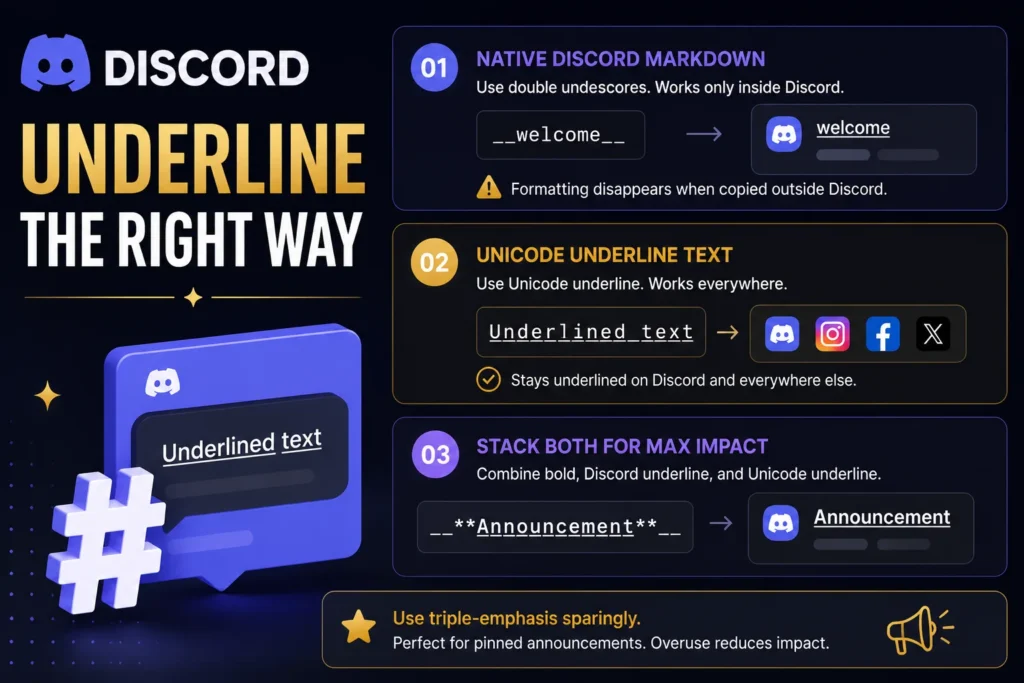
Discord has two separate underline systems, and mixing them up is the most common mistake. Native Discord markdown underlines text by wrapping it in double underscores, like __welcome__, and Discord renders that as underlined inside the app. The problem is that formatting only exists at display time. Copy that underlined text out of Discord into Instagram or a status update, and the underline disappears because there was never an actual underline character there, just markdown Discord interpreted.
Unicode underline text solves that. Generate it here and it stays underlined in Discord messages, usernames, server names, and channel topics, and it keeps working if you paste it somewhere else entirely.
You can also stack the two methods for a stronger effect. Wrapping Unicode underlined text inside Discord’s own bold-underline markdown, like __**A̲n̲n̲o̲u̲n̲c̲e̲m̲e̲n̲t̲**__, gives you bold plus underline plus a Unicode underline that survives outside Discord too. Use this kind of triple-emphasis sparingly. It’s effective for pinned announcements, but it stops standing out if every message looks like that.
Learn about discord text formatting
Google Docs and Word
If you’re formatting an actual document rather than a social post, skip the generator and use native underline instead. Highlight your text and press Ctrl+U on Windows or Cmd+U on Mac in both Google Docs and Microsoft Word. This creates real formatting that prints correctly and stays editable, which Unicode underline text won’t do since it’s just special characters, not an adjustable format.
Which Characters Don’t Underline Well
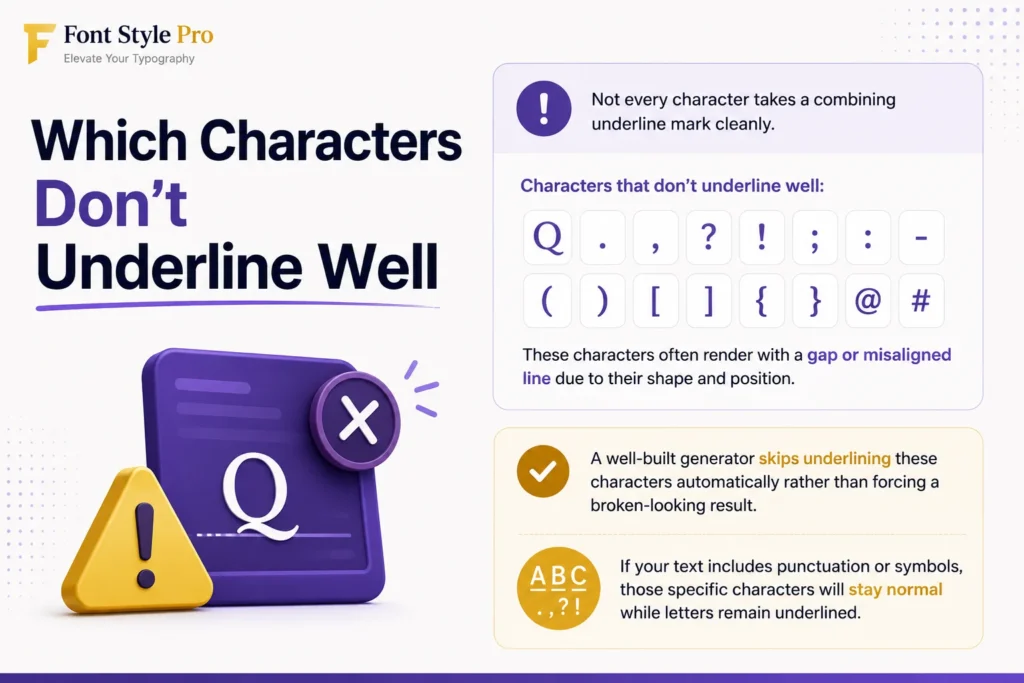
Not every character takes a combining underline mark cleanly. Capital Q and most punctuation marks (. , ? ! ; : – ( ) [ ] { } @ #) tend to render with a gap or a misaligned line because of how their shapes sit relative to the combining mark.
A well-built generator skips underlining these characters automatically rather than forcing a broken-looking result. If you’re pasting a phrase heavy on punctuation or symbols, expect those specific characters to stay in normal text while the letters around them carry the underline.
Underline vs. Double Underline vs. Overline vs. Strikethrough
These four effects get lumped together, but they signal different things and suit different use cases.
Rule of thumb: use single underline for anything meant to be read normally, and save double underline or decorative styles for short standalone words where style matters more than length.
Troubleshooting: Why Your Underlined Text Isn’t Showing Correctly
If your underlined text looks broken, boxed, or has odd spacing, it’s almost always a font rendering issue on the receiving device, not a problem with the text itself. Older Android versions (particularly below Android 9) shipped system fonts that don’t handle combining diacritics smoothly, which can create visible gaps between letters and their underlines.
The fix isn’t on your end. Switching to the simplest single-underline style tends to render most reliably across old and new devices alike, since complex styles (wavy, dotted, double) ask more of the font renderer and fail more often on older hardware.
Is Underlined Unicode Text Accessible?
Screen readers don’t always interpret Unicode combining characters correctly, and some read them as garbled or skip them entirely. This matters if you’re using underlined text somewhere visually impaired users rely on assistive technology to read your content.
For critical information like contact details, links, or instructions, stick to plain text. Save Unicode underline styling for decorative or emphasis use in bios and captions where accessibility isn’t the primary function of the text.